How to Use and Review the Results of O-net.com’s “Net de Shindan”
When running a WordPress blog on a home server or cloud environment, even if you regularly update your OS and plugins, you rarely get an objective opportunity to gauge how secure your site actually appears from the outside.
Recently, when it was time to renew a domain managed through O-net.com, I noticed their website security and health check tool, “Net de Shindan" (Net Diagnosis), was offered with a “first month free for 330 yen (immediate cancellation OK)" promotion. Since it was an opportunity to try it out without incurring extra costs, I decided to run the diagnostic on my active blog (donguri3.net).
Understanding Objective Evaluations and Testing Within the Free Scope
The purpose here was to take stock of server and web service risk levels from an external scanner’s perspective—rather than through the administrator’s subjective lens—and identify areas that need prioritized attention.
I set the following two goals:
- Verify the entire process from applying for the diagnosis to checking the results and completing the cancellation procedure within the free first-month period.
- Accurately understand the current evaluation rank and the number of detected risks to incorporate them into future server maintenance plans.
Terms of Use and Precautions When Publishing Results
Before actually using the tool and summarizing the results on my blog, there were a few points I needed to keep in mind.
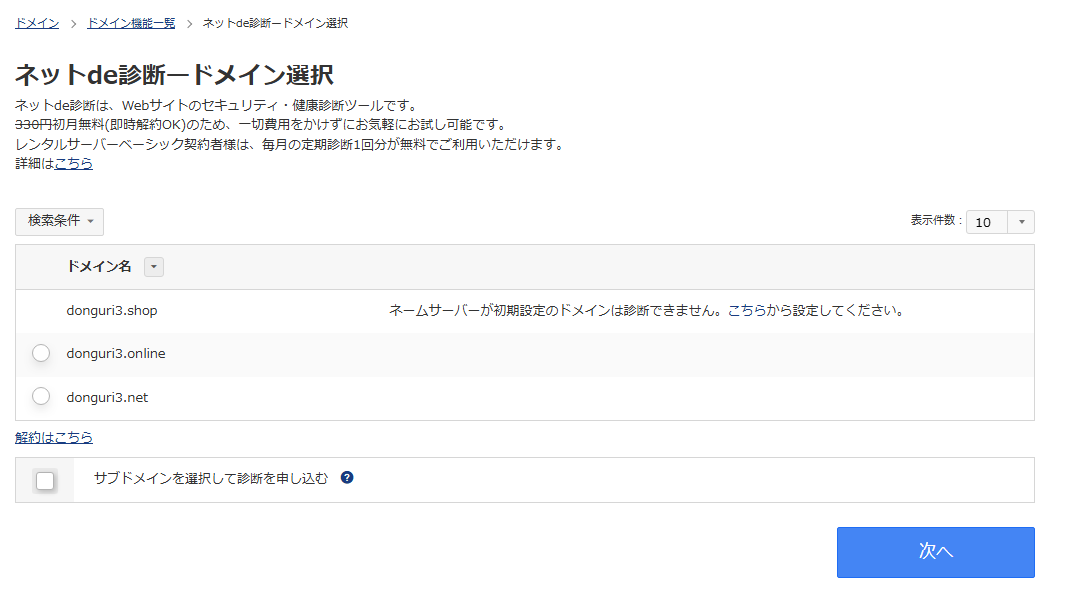
First, regarding specifications, domains with their name servers left at default settings cannot be selected for diagnosis. Also, if you only want to try it out without incurring ongoing charges, you must remember to complete the cancellation procedure from the management console.
Even more important is how the diagnostic results are handled. Net de Shindan specifically highlights potential entry points for attacks, such as server version information and service flaws. Publishing specific vulnerability names, server IP addresses, or configuration details directly in an article is dangerous as it essentially hands attackers a blueprint of your weak points. Therefore, when sharing results on a blog, you must carefully draw the line on what information to make public.
Steps for Running and Canceling the Diagnosis via O-net.com Navi
All operations for the actual diagnosis and cancellation are completed within the O-net.com Navi management screen.
Application Procedure for Diagnosis
- Log in to O-net.com Navi and click “Net de Shindan" from the left-hand sidebar.
- On the “Net de Shindan – Domain Selection" screen, select the domain you want to diagnose and click “Next." If you also want to check subdomains, check the box for “Select subdomains to apply for diagnosis" at the bottom.

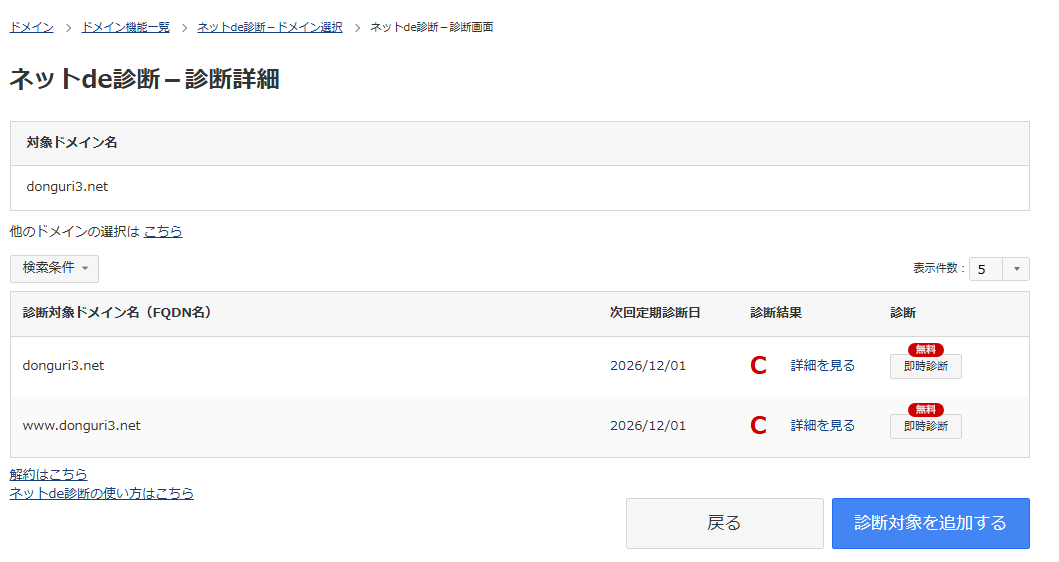
- Once you transition to the “Net de Shindan – Diagnosis Details" screen, click the “Immediate Diagnosis (Free)" button to the right of the target domain name (FQDN).

- Wait for the diagnosis to complete. When I ran it this time, it took a few tens of minutes for the results to appear.
Cancellation Procedure
If you only want to use it on a trial basis, you can complete the cancellation via the “Click here to cancel" link located at the bottom left of the domain selection screen or diagnosis details screen. On the “Net de Shindan – Cancellation (Domain List)" screen, check the box for the domain you wish to cancel and proceed to “Next." Review the notices (such as non-refundability and agreement to terms) on the “Net de Shindan – Cancellation Confirmation" screen and press the “Confirm" button to complete the cancellation of the recurring diagnosis. No retention screens or phone calls were required; I was able to cancel smoothly right from the web page.
donguri3.net Diagnosis Result: “Grade C / 32 Risk Items"
After waiting a few tens of minutes, the diagnosis result for donguri3.net was a “C" grade on a 5-tier scale from A to E. A warning was displayed on the screen stating: “A grade C rating may include risks that could lead to potential external attack vectors."
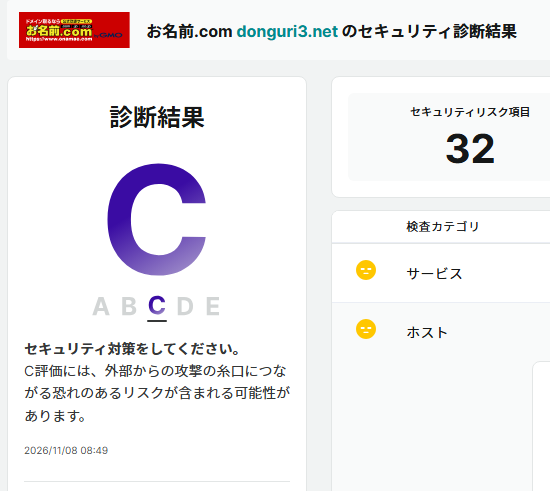
A total of 32 security risk items were detected, with the breakdown as follows:
- Risk Level “Medium": 2 items
- Risk Level “Low": 3 items
- Information: 27 items
One of the medium risks pointed out was “Use of software with known vulnerabilities (canonical ubuntu_linux/22.04)" on the host side. This was categorized under version management deficiencies, and the description explained that in addition to applying patches, obscuring version information is important. An old Ubuntu 22.04 instance remaining under a load balancer configuration was accurately detected from the outside.
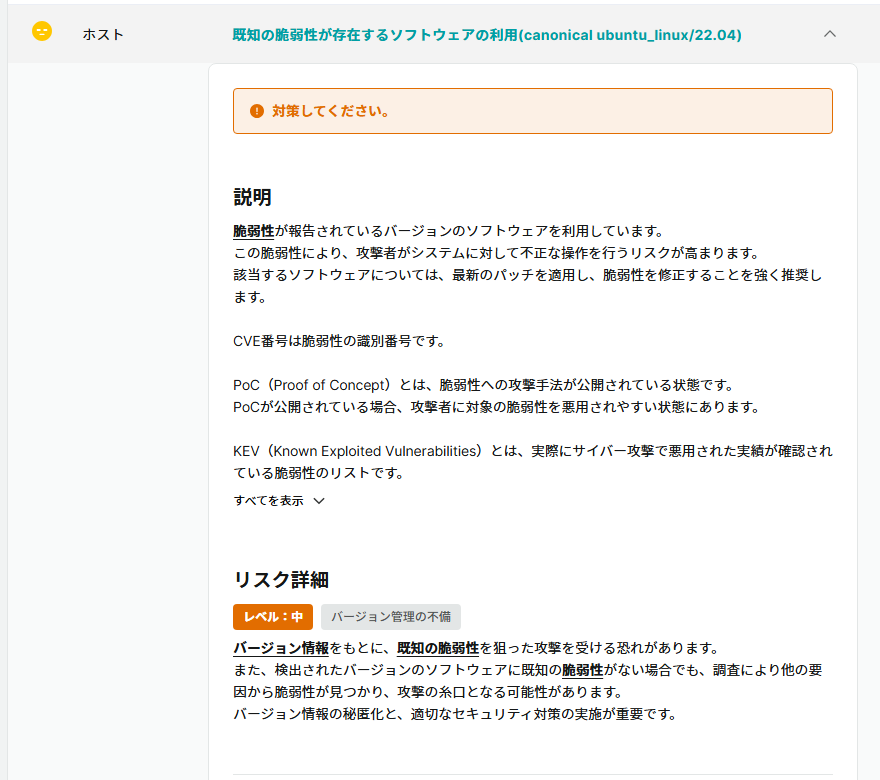
As for the remaining 1 medium risk and 3 low risks, specific items and target information have been omitted from this article as publishing them could provide entry points for attacks. All of them served as a great catalyst to progressively implement countermeasures through access control and configuration reviews on the web server side.
(\*When posting screenshots of diagnostic summaries or similar, make sure to mask IP addresses, account information, and any unpublished subdomains before inserting them.)

 https://link.amazon/B09u4TNib
Conclusion
Taking advantage of my domain renewal, I tried out O-net.com’s “Net de Shindan" during its free first-month period. I selected the target domain from the left menu of the management screen to run an immediate diagnosis, and a few tens of minutes later, I received a grade C result (with 32 risk items). This visualized specific areas for improvement, such as the use of an older Ubuntu 22.04, providing a great opportunity to proceed with improvements. Note that detailed items have been omitted from the article to prevent minor vulnerabilities or misconfigurations from serving as potential attack vectors if published as-is. Cancellation was also completed smoothly via the dedicated link, making this a handy feature to easily try out as a health check to understand your site’s current status.