Attaching a Genuine Intel Cooler to the “MS-NH1” Stick PC to Eliminate Thermal Throttling
While cleaning up my room, I happened to find a Mouse Computer stick-type PC “MS-NH1-W10" that had been resting deep inside a drawer for a long time.
Amazon | mouse パソコン スティックPC MS-NH1-W10 Windows10/2GB/32GB | マウスコン
Unknown ...
 https://amzn.to/3StLViQ
This model features a palm-sized ultra-compact enclosure equipped with a quad-core Intel Atom Z3735F CPU (base clock 1.33GHz, burst up to 1.83GHz), 2GB of main memory, and 32GB of eMMC. It came pre-installed with Windows 10 Home (32-bit), but by modern standards, its specs are quite severe, so it had been left unused.
I booted it up to check its current operational status, and found that the CPU temperature easily exceeded 70°C almost immediately after OS startup or during light browsing. The internal tiny fan and heat spreader couldn’t keep up with the heat dissipation, causing severe thermal throttling. Checking Task Manager, the operating clock had plummeted to around 500MHz—less than half of its rated speed—making the mouse pointer movement visibly laggy and sluggish.
While I don’t have a specific use case in mind, it felt wasteful to simply throw it away, so I decided to try a pointless modification to drastically enhance the cooling mechanism.

 https://amzn.to/4h05uap
Avoiding Thermal Throttling and Maintaining the Rated Clock
The goal of this modification is to completely suppress thermal throttling caused by thermal runaway and create a state where the CPU’s original processing performance can be constantly utilized.
I set the following two specific target values:
- Keeping the CPU temperature around 40°C even under high load
- Preventing the operating clock from dropping to 500MHz and keeping it running stably at the rated 1.33GHz
While the portability as a small PC is completely lost, ensuring stable operation as a stationary device is given top priority.
Fabricating a 3D Printed Mount and 5V Low-Speed Fan Drive
I modeled and 3D printed a dedicated mount.
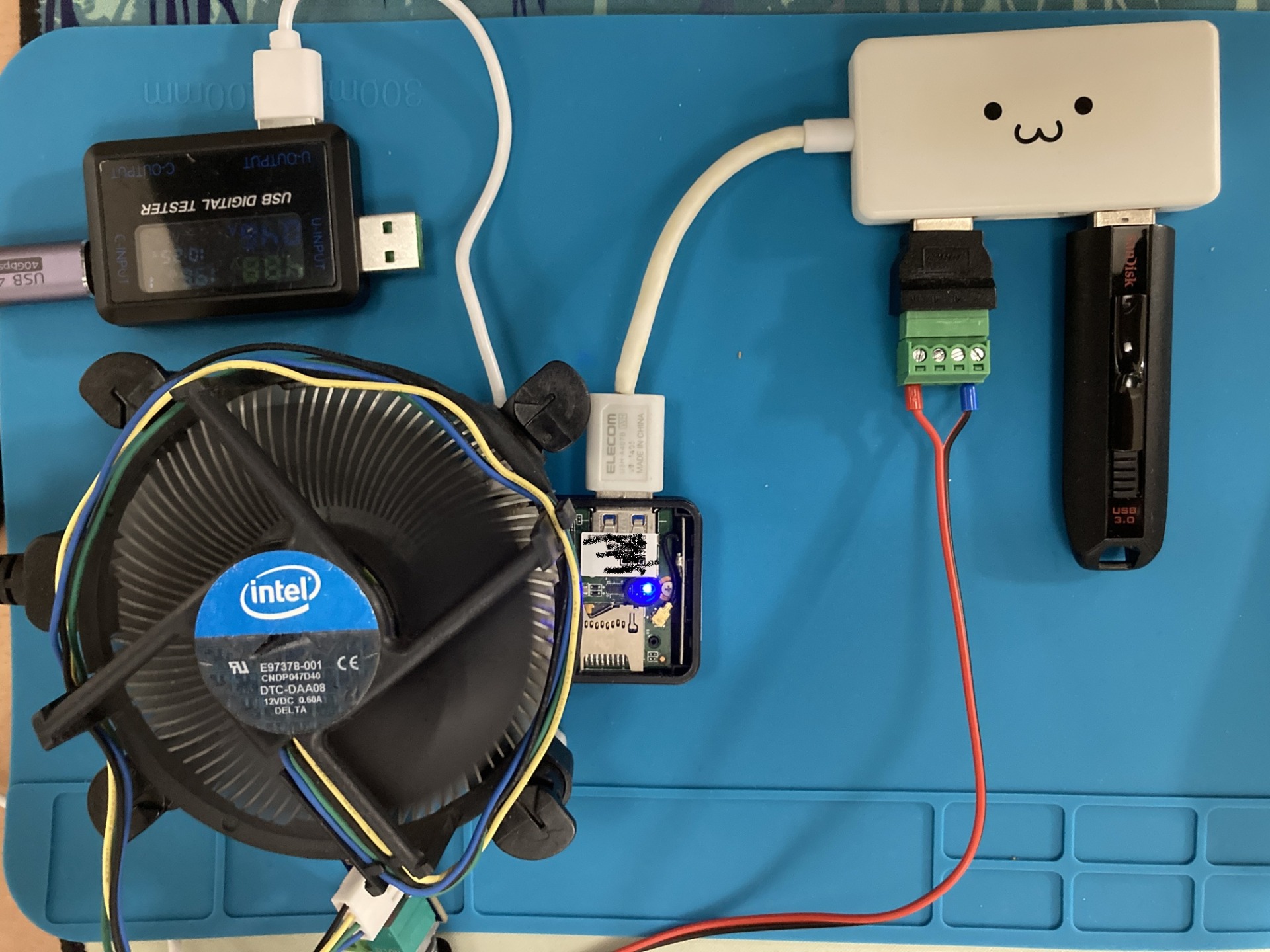
The genuine Intel cooler has four push-pin holes for motherboard fixing. I measured the pitch of these push-pin holes and designed a structure where the protrusions on the mount snap right in using the push pins. I aligned the position so that the MS-NH1 board and heat sink tightly adhere to the center of the cooler. When I actually installed it, I was able to securely clamp it without any looseness by reusing the genuine fixing pins as-is.
For thermal conduction between the heat sink and the cooler’s contact surface, I applied an appropriate amount of “Arctic MX-4," a standard thermal grease, to minimize thermal resistance.
Next is the fan power supply method. Although the E97378-001 is a PWM-compatible 4-pin fan rated for 12V operation, this time I drew power from the USB port (5V) of the MS-NH1 itself. Since I confirmed that even a 12V-specified fan can barely maintain rotation with a 5V supply, I routed it through a single-port type PWM fan controller to run it quietly at the minimum rotation speed.
Although I attempted to actually measure the control frequency of the PWM signal, my oscilloscope happened to be broken, so I skipped checking the frequency waveform.
Verification of Cooling Effect and Operating Clock
After completing the modification, I booted the system and verified the changes in temperature and clock speed.
The results are as follows:
- CPU Temperature: Dramatically dropped from over 70°C at idle to light load down to around 40°C
- Operating Clock: Escaped the sluggish 500MHz caused by thermal throttling and became completely stable at 1.33GHz
In terms of cooling, I obtained results with no room for complaint, and thermal throttling was completely eliminated.
However, regarding the responsiveness of Windows 10 itself, frankly speaking, a “sluggish" heaviness remained. While extreme stuttering was reduced by raising the clock from 500MHz to 1.33GHz, the physical hardware configuration—the processing capacity of the Atom Z3735F, a mere 2GB of main memory, and a slow eMMC—is definitively insufficient to run modern Windows 10 comfortably. Even by enhancing cooling to the absolute limit, the fundamental barrier of the OS’s own weight could not be broken.
 https://amzn.to/4cyFvFQ
Conclusion
To solve the heat problem of the neglected “MS-NH1-W10" stick PC, I introduced a genuine Intel cooler “E97378-001" and MX-4 grease. By fabricating a 3D-printed mount utilizing the push-pin holes and running the fan at low speed via a 5V USB power supply and PWM controller, the CPU temperature dropped from over 70°C to 40°C, and the clock was able to maintain its rated operation of 1.33GHz instead of 500MHz. Although it was a success as a cooling modification, the heaviness of Windows 10 could not be resolved due to the limitations of the hardware specifications. Moving forward, I plan to leverage this stable cooling environment to install a lightweight Linux distribution and repurpose it as a toy and experimental machine.