Causes and Solutions for reCAPTCHA v3 Connection Failures (HTTP 418) in Luxeritas
While the comment section of this blog had been working normally as of June 2026, I suddenly noticed that no comments were being posted at all. Upon checking the comment section out of suspicion, I found that the “SiteGuard WP Plugin" hiragana image CAPTCHA, which we had been using as a spam countermeasure, was displaying an error, leaving readers unable to submit comments.
While SiteGuard’s image CAPTCHA was effective at blocking non-Japanese speaking spam, it forced readers to input characters every time they submitted a comment, posing a usability challenge. Taking advantage of this recovery from the failure, I decided to overhaul the comment section by eliminating the manual-input image CAPTCHA and migrating to “Google reCAPTCHA v3," which scores behavior in the background.
Balancing Reduced Input Burden and Spam Elimination
When introducing reCAPTCHA v3, I also decided to review the design of the comment form itself. The “Email Address" and “Website URL" input fields present in WordPress’s standard comment form can act as a psychological barrier for readers posting feedback on a general personal blog.
Therefore, I aimed to narrow down the form fields to just two items: “Name" and “Message," and reorganize the input order to “Name → Message."
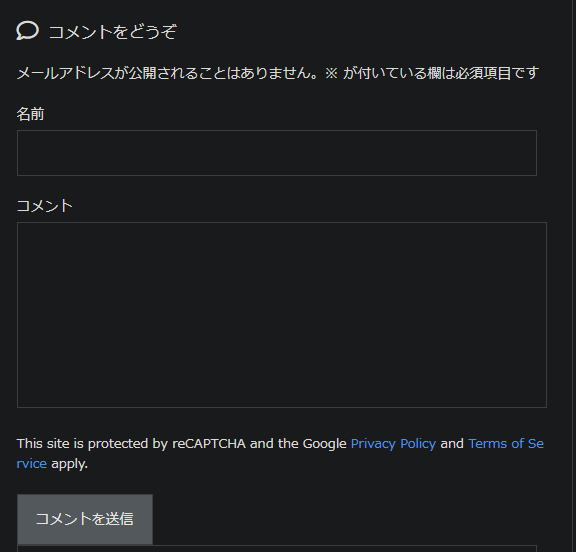
The operational goals are as follows:
- Reduce the reader’s input burden to zero (eliminate image selection and character entry, and reduce required input fields to just name and message).
Since WordPress’s “Settings" → “Discussion" and Luxeritas’s theme standard features do not include settings to completely remove specific input fields or rearrange their order, I decided to control the layout via filter hooks using a custom plugin (mu-plugins).
“Connection to the authentication server failed" and HTTP 418 Blocking Submissions
After generating the v3 site key and secret key in the Google reCAPTCHA management console, I registered each key from the Luxeritas appearance customization screen and saved the settings.
Once the setup was complete, I sent a test comment from my browser to verify its operation, but the process was interrupted with the following error message:
Google reCAPTCHA : Connection to the authentication server failed. Please try again later.
Suspecting that communication from the web server to Google’s API endpoint was being blocked based on the phrase “Connection failed," I checked the network traffic using browser developer tools (F12). The HTTP status code returned from the POST target, wp-comments-post.php, was the unfamiliar “418 I’m a teapot."
I was faced with a situation where it was impossible to determine from the error screen message alone whether it was a network communication error with an external API, a server or proxy misconfiguration, or a theme bug.
Server Reachability Test and Analysis of Luxeritas Internal Code
First, to isolate whether “connection to the authentication server" was failing as the error message stated, I checked the connectivity to Google’s authentication API from inside the Docker container running WordPress.
curl -Iv https://www.google.com/recaptcha/api/siteverify
The cURL command from inside the container immediately resolved the DNS name, passed the SSL handshake, and returned HTTP/2 200. Furthermore, I tested the behavior via CLI when routed through WordPress’s HTTP request functions.
php -r 'require "wp-load.php"; $res = wp_remote_post("https://www.google.com/recaptcha/api/siteverify"); var_dump($res);'
This execution result also returned HTTP/1.1 200 OK, and the response body contained invalid-input-response (a normal error response due to an unspecified token) as the response from the Google API. This confirmed that communication in the infrastructure layer—including the OS, container, PHP, cURL, and SSL certificates—was completely healthy, and that external communication blocking was not the cause. Next, I searched for the error message within the Luxeritas theme files to check the processing logic directly.
grep -rn "Connection to the authentication server failed" wp-content/themes/luxeritas/
Upon checking the comment processing hook in wp-content/themes/luxeritas/functions.php, which was the relevant location, I found decisive code.
if( isset( $_POST['g-recaptcha-response'] ) ) {
$verify = 'https://www.google.com/recaptcha/api/siteverify?secret=' . $luxe['recaptcha_secret_key'] . '&response=' . $_POST['g-recaptcha-response'];
$ret = thk_remote_request( $verify );
...
if( !isset( $json->success ) || ( isset( $json->success ) && $json->success !== true ) ) {
wp_die( $msg1, '', array( 'response' => 418, 'back_link' => true ) );
}
...
}
else {
wp_die( $msg1, '', array( 'response' => 418, 'back_link' => true ) );
}
Two facts became clear from this code. The true identity of status code 418 was a custom specification intentionally passed to wp_die() by Luxeritas when it interrupts comment processing. The variable $msg1 (“Connection to the authentication server failed") was specified to be output commonly not only during actual communication errors, but also in the else clause when $_POST['g-recaptcha-response’] did not exist. In other words, it wasn’t actually that it connected to Google’s server and failed, but rather that “the error was caused because no token was sent from the browser, so it was immediately rejected with 418."
Identifying Form Data Omission and Field Destruction by the Custom Plugin
I opened the “Network" tab of the browser’s developer tools and checked the Payload (Form Data) of the submitted POST request (wp-comments-post.php).
author=%E3%81%A6&comment=%E3%81%82%E3%81%82%E3%81%82&submit=%E3%82%B3%E3%83%A1%E3%83%B3%E3%83%88%E3%82%92%E9%80%81%E4%BF%A1&comment_post_ID=5563&comment_parent=0
The transmitted data did not contain g-recaptcha-response, which is the reCAPTCHA authentication token, at all.
As I investigated why the token was not being sent from the frontend, I hit upon a custom mu-plugin (wp-content/mu-plugins/comment-form-layout.php) that I had previously created and placed myself.
</pre>
add_filter( 'comment_form_fields', function( $fields ) {
// Remove unnecessary items
unset( $fields['email'], $fields['url'] );

$new_fields = array();

// Place the name field at the beginning
if ( isset( $fields['author'] ) ) {
$new_fields['author'] = $fields['author'];
}

// Place the comment field
if ( isset( $fields['comment'] ) ) {
$new_fields['comment'] = $fields['comment'];
}

return $new_fields;
} );
<pre>
This code was the root cause of the bug. WordPress’s comment_form_fields filter hook passes all elements output within the form (such as name, email, and message, as well as hidden fields and script markup inserted by themes or plugins) as an associative array.
In the code above, a new empty array $new_fields was created, and only author and comment were packed and returned. As a result, components that Luxeritas was outputting within the form for reCAPTCHA v3 control and token passing were completely discarded along with the email and URL fields.
My past, clumsy code—which I had assumed was fine because “the display order of the name and message changed correctly on the screen and it displays properly"—caused a fatal bug when another feature (reCAPTCHA) was added. It gave me a lot of introspection regarding the lack of awareness that WordPress filter hooks are a pipeline shared with other plugins and themes.
Fixing and Restoring via Safe Hook Implementation Using array_merge
Having identified that the cause was array overriding destruction by the custom plugin, I modified the code. I revised the implementation to safely keep unknown fields added by other theme features and plugins at the end without discarding them.
Rewrote wp-content/mu-plugins/comment-form-layout.php to the following code.
<?php
/**
* Plugin Name: Nando Comment Form Custom Layout
* Description: Changes the comment form order to "Name → Message" and removes unnecessary fields (email and URL).
* Version: 1.0.1
* Author: 納戸工房
*/

if ( ! defined( 'ABSPATH' ) ) {
exit;
}

add_filter( 'comment_form_fields', function( $fields ) {
// Remove unnecessary items (email and site URL)
unset( $fields['email'], $fields['url'] );

// Temporarily back up the comment message field and remove it from the array
$comment_field = '';
if ( isset( $fields['comment'] ) ) {
$comment_field = $fields['comment'];
unset( $fields['comment'] );
}

$new_fields = array();

// 1. Place the name field at the beginning
if ( isset( $fields['author'] ) ) {
$new_fields['author'] = $fields['author'];
unset( $fields['author'] );
}

// 2. Place the message field second
if ( ! empty( $comment_field ) ) {
$new_fields['comment'] = $comment_field;
}

// 3. Keep and merge the remaining fields added by the theme or other plugins at the end
return array_merge( $new_fields, $fields );
} );
The key point of the modification is performing array_merge( $new_fields, $fields ) after reconstructing the array. Elements that were not explicitly unset from the original $fields array (such as hidden fields or control markup injected via hooks by the theme or other plugins) are not discarded, but are all retained at the end and returned to the WordPress core.
After completing the code modification, I executed “Purge All Cache" from the LiteSpeed Cache management screen to clear the old HTML cache.
After that, I opened the comment section of the relevant article from a browser’s incognito window and sent a test comment.
Immediately after pressing the submit button, without encountering an error screen (HTTP 418), the posted comment was instantly reflected on the screen. When I re-checked the Payload (Form Data) of the request (wp-comments-post.php) sent via browser developer tools, the long alphanumeric token was successfully stored in g-recaptcha-response, which had previously been missing.
Note that unlike conventional v2, reCAPTCHA v3 does not display image selections or a “I’m not a robot" checkbox; instead, it automatically judges users with a score from 0.0 to 1.0 by analyzing their behavior in the background. Therefore, if authentication passes successfully, no errors or UI changes occur, and comments are posted as-is. If you want to check whether it is truly operating, you can grasp the objective operation logs by opening the Google reCAPTCHA management console and checking the recent request volume graph and score distribution (whether it is judged as human with a high score).
Conclusion
When migrating to reCAPTCHA v3 prompted by a SiteGuard image CAPTCHA error, “Connection to the authentication server failed (HTTP 418)" occurred. As a result of server reachability tests and theme analysis, it turned out that the cause was not a communication failure, but a missing token transmission. The root cause was that a custom hook for cleaning up the comment section had collateral-damaged the reCAPTCHA elements. By modifying the code to be safe and retain existing elements using array_merge, we were able to restore normal comment reception without input burden. Designing hook processing so as not to break the shared pipeline is essential.