Mind Elixir × Custom WordPress Plugin: Added Features for Saving, Switching, and Deleting Multiple Mind Maps
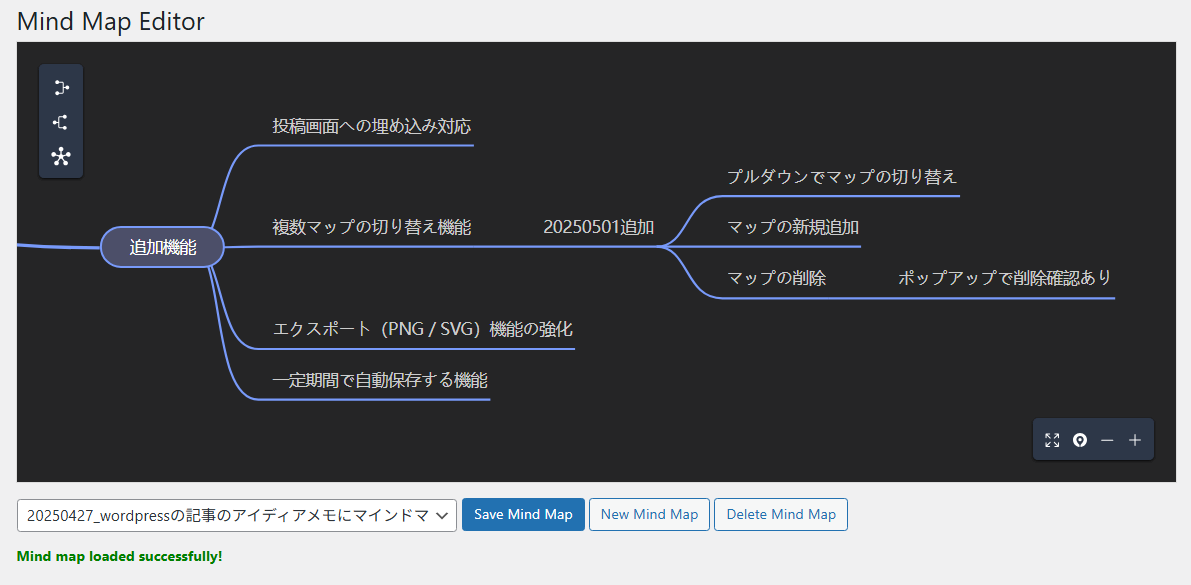
Previously, I built a custom WordPress plugin that allows users to create, switch, and delete multiple mind maps directly within the WordPress dashboard (I tried making a plugin to jot down post ideas using mind maps in the WordPress admin screen). This time, I’ve added a multiple map management feature. It’s now a fully-featured version where you can load topics via a dropdown, save JSON data to wp_options with a prefix, and even include a delete button, a confirmation dialog, and a “New Map" button.
Final Specifications
-
Display mind map topics in the dropdown
-
Save to
wp_optionswith the prefixmind_elixir_map_data_ -
Add a delete button
-
Show a confirmation popup when the delete button is clicked
-
Add a button to create new maps
Implementation Highlights
Managing Topics via Dropdown
-
Run
SELECT option_name, option_value … WHERE option_name LIKE 'mind_elixir_map_data_%'on the server side and decode the JSON -
Extract the root node’s
nodeData.topicand set it as the display text for<option> -
Fetch the list via AJAX on the JavaScript side and dynamically re-render using
$('#mea-map-selector').empty().append(...)
Registering Options with a Prefix Upon Saving
-
When the save button is clicked, stringify the JSON obtained from
mind.getData() -
Generate
option_nameusing the prefix plus the current date and time (YmdHis), and persist it viaupdate_option()
Delete Button and Confirmation Dialog
-
Trigger a confirmation popup using
window.confirm()when the button is pressed -
If OK, execute
delete_option()via AJAX and re-render the list upon success
New Map Addition Button
-
Generate data from
MindElixir.new()with a fixed topic of “New Mind Map" -
Add a new option to the dropdown, making it immediately ready for loading and saving
Conclusion
With this plugin, I implemented an administrative interface that makes it easy to save, switch, and delete mind maps using WordPress’s wp_options table.
-
Dropdown: List items by topic
-
Save: Automatically generate option names using prefix + timestamp
-
Delete: Safely remove items with a confirmation dialog
-
New Addition: Generate a blank map with a single button
The GitHub repository is also publicly available, so please give it a try!