A True Account of Enabling QUIC.cloud on a Home WordPress Server (OpenLiteSpeed + WireGuard Exposure)
I was stuck trying to enable the LiteSpeed Cache CDN (QUIC.cloud) on my home WordPress server (running OpenLiteSpeed, hereafter OLS). However, I managed to break through using a three-stage rocket approach:
- ① Temporarily insert nginx as an L7 terminator to append X-Forwarded-For →
- ② Register with QUIC.cloud →
- ③ Remove nginx and revert to the L4 architecture using WireGuard + iptables.
Since then, HTTP/3 is terminated on the CDN side, while the origin remains OLS for a lightweight setup.
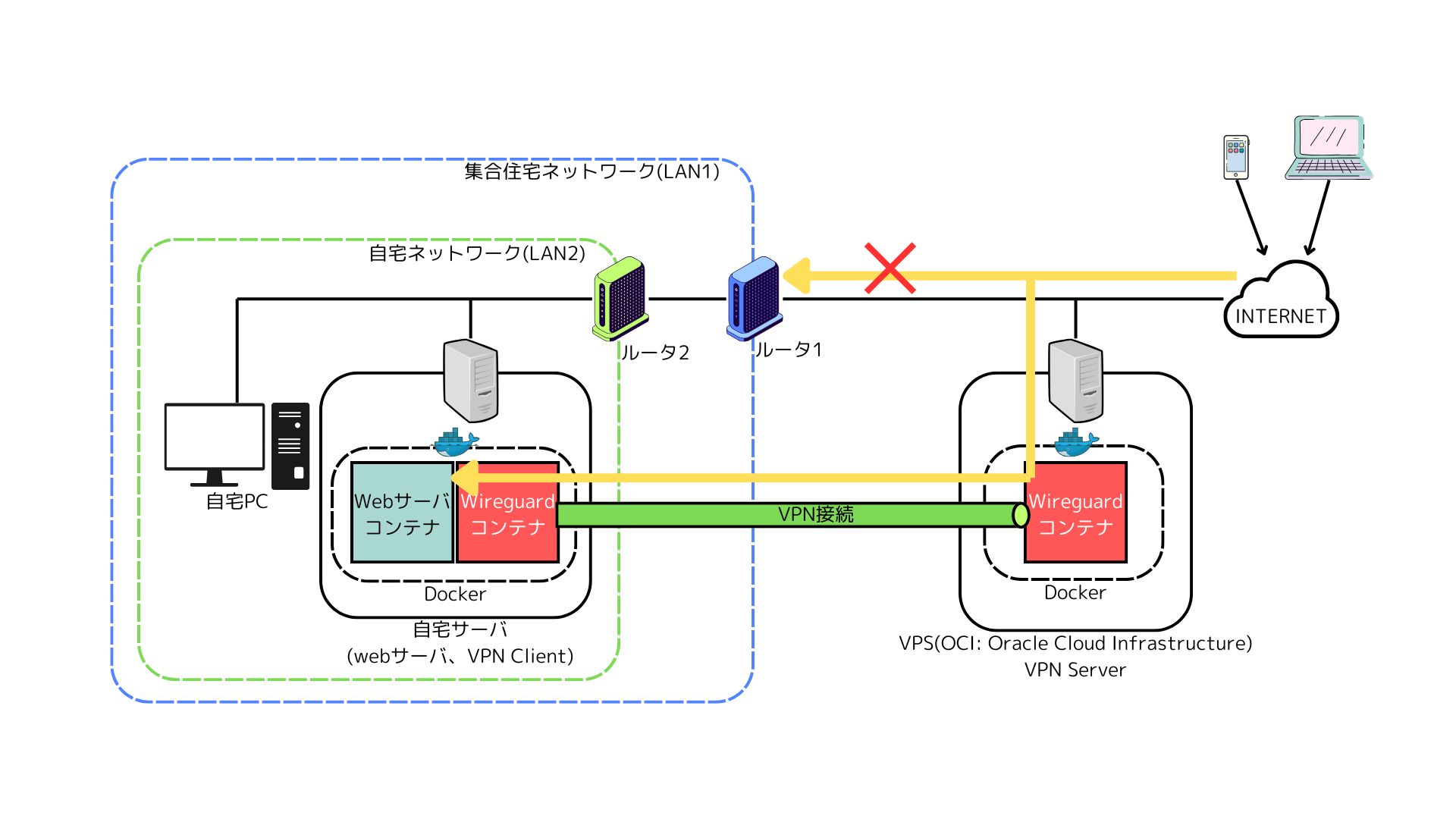
I have already summarized the foundation for exposing a home server using a remote server (Oracle Cloud Infrastructure Free Tier) × WireGuard in another article. Please refer to that post for details on how to set up the exposure route:
Exposing a Web Server in an Apartment Complex Network Using WireGuard and a VPS (OCI)
In this article, I will focus specifically on the stumbling blocks and workarounds for enabling QUIC.cloud.
Architecture and Terminology
- Remote (OCI): WireGuard (hereinafter WG-Remote)
- Local (Home): WireGuard (hereinafter WG-Local) → OpenLiteSpeed (OLS) → WordPress
- Route: Internet → (CDN: QUIC.cloud) → WG-Remote → (Tunnel) → WG-Local → OLS
| Term | Layer/Category | Function |
|---|---|---|
| L4 (Layer 4) | Network (Transport Layer) | Port-based forwarding/load balancing, DNAT/SNAT, etc. |
| DNAT | L4/NAT | Securely relays external ports to the backend server |
nginx stream |
L4 | Relays 80/443 (TCP) and 443/UDP (QUIC) |
| L7 (Layer 7) | Application Layer | Appends X-Forwarded-For, hostname/URL-based control, WAF |
| OLS (OpenLiteSpeed) | Web Server | High-speed delivery, LSCache integration, QUIC (depending on conditions) |
| X-Forwarded-For (XFF) | HTTP Header (L7) | Passes the real IP to the application/logs |
| CDN (QUIC.cloud) | Delivery Network | Caching, TLS/HTTP3, DDoS mitigation, PoP optimization |
Enabling WordPress LiteSpeed Cache CDN (QUIC.cloud)
- Conditions for enabling LiteSpeed Cache CDN (QUIC.cloud)
- …/?rest_route=/lscwp/ip-check must return remote_ip (route IP) + x_forwarded_for (client real IP)
Why I Got Stuck
- X-Forwarded-For cannot be added at L4
nginx stream and simple DNAT cannot touch the “inside" of TCP/UDP packets. - OpenLiteSpeed does not support PROXY protocol
Tricks to carry the original IP via L4 (PROXY proto) cannot be used with OLS either. - Result: WordPress/OLS cannot recognize the real client IP, causing LiteSpeed Cache’s ip-check / CDN activation to be rejected.
Solution
- Temporarily insert nginx in front at L7 (HTTP)
Set up an nginx container on the remote side, perform TLS termination, andX-Forwarded-Forattachment. The backend connects to OLS via WireGuard./?rest_route=/lscwp/ip-checkwill now returnremote_ip+x_forwarded_for.
- Enable LiteSpeed Cache CDN (QUIC.cloud) in this state
Ownership verification and registration will pass. Confirm thatx-qc-popandalt-svc: h3=":443"appear in the response. - Remove nginx and revert to L4 (WireGuard + iptables DNAT)Exposed ports :80/:443 (and :443/udp if needed) are set to DNAT → OLS. Configure OLS with “Use Client IP in Header = Trusted IP Only", and register the tunnel peer’s source IP in the Allowed List with a
Tflag (= acceptXFFonly from trusted proxies).From then on, HTTP/3 is terminated at the CDN side, keeping the origin lightweight.
Key takeaway: “Insert L7 only during registration to guarantee XFF" → Revert to L4 after registration. CDN handles operations, origin remains minimal.
Implementation Notes (Example)
Example of temporary nginx (L7)
server {
  listen 443 ssl http2;
  server_name example.com;
  ssl_certificate     /etc/ssl/fullchain.pem;
  ssl_certificate_key /etc/ssl/privkey.pem;
  location / {
    proxy_pass https://<OLS_IP>;
    proxy_http_version 1.1;
    proxy_set_header Host $host;
    proxy_set_header X-Forwarded-For $proxy_add_x_forwarded_for; # ←This is it!
    proxy_set_header X-Forwarded-Proto https;
    proxy_set_header X-Real-IP $remote_addr;
  }
}
This allows ip-check to recognize the “real IP (XFF)" and completes the QUIC.cloud activation.
After Reverting to L4 (WireGuard + DNAT)
- DNAT: Public :80/:443 (and :443/udp if needed) → OLS :80/:443
- SNAT/MASQUERADE: Restricted only to “traffic originating from wg0 destined for OLS" (fixed return route)
- FORWARD: Allow only WAN→wg0 destined for OLS / Returns allowed via ESTABLISHED,RELATED
- OLS: Set Use Client IP in Header = Trusted IP Only, register the tunnel peer IP with a T flag in the Allowed List (= accept XFF only from trusted proxies)
Only keep UDP/443 DNAT if you want to receive direct access via HTTP/3. Unnecessary if CDN termination is sufficient (also reduces attack surface).
Verification Methods
- CDN-proxied headers
curl -I https://example.com | tr -d '\r’ | grep -i 'server\|x-qc-pop\|alt-svc’ - CDN bypass (fixed SNI)
curl -vk –resolve example.com:443: https://example.com/ | head -n1 - WordPress-side view (using a test script)
Success if REMOTE_ADDR shows the real IP and X-Forwarded-For contains the same initial IP.
Pitfalls to Watch Out For
- XFF cannot be attached with L4 alone (HTTP headers are an L7 concept)
- OpenLiteSpeed does not support PROXY protocol (cannot carry the original IP via L4)
- Broad iptables MASQUERADE is dangerous: restricting by sending IF & destination subnet is the ironclad rule
- Do not expose :80/:443 across multiple containers (watch out for docker-proxy conflicts)
Summary
- Unless XFF is visible, QUIC.cloud’s ip-check will not pass.
- Therefore, interject L7 (nginx) only during registration to guarantee XFF, and revert to L4 (WireGuard + DNAT) once registration is complete.
- Operationally, terminate HTTP/3 at the CDN and keep the origin light with OLS.
- Limit OLS to trusted proxies using Trusted IP Only + Allowed List.
Through this workflow, I was able to successfully leverage QUIC.cloud even with a Home Server × WireGuard × OCI setup.