Desktop PC Power Supply Failure and Recovery
To put it bluntly, the cause of this recent issue where “the PC fans spin but no image appears on the screen" was the aging deterioration of the power supply unit (PSU). Replacing it with a new PSU completely resolved the problem.
Specifically, the symptoms were as follows: when pressing the desktop PC’s power button, the CPU fan and graphics board (GPU) fans would spin normally, and the LEDs on each component would light up, but nothing would be displayed on the screen, and even the BIOS failed to boot.
There were warning signs of this symptom about a year ago. On several occasions after shutting down, the PC wouldn’t boot up smoothly, and each time, a regular clicking sound (“tick-tick-tick-tick") could be heard near the power supply unit. At the time, I managed to get it to boot by repeatedly toggling the main power switch or unplugging and replugging the power cord, so I left it without performing fundamental repairs. However, yesterday, it finally reached a state where even this method failed to boot it entirely.
Repairing the Non-Booting PC
The goal of this recovery process was to identify the cause of the completely unresponsive PC through a logical procedure and restore it to a normal operating state where video output is safely resumed.
Rather than blindly replacing parts at a stage where the cause was unknown, the operational strategy was to exhaust verifiable tests possible with my current setup and accurately recover the operating environment based on solid judgment.
Identifying the Cause Through Verification Steps
To avoid guesswork parts replacement, I decided to limit the verification process to [within 3 steps]—namely, “1. Checking the memory," “2. Initializing the motherboard," and “3. Verifying the power supply environment"—to reliably pinpoint the cause.
Failure of Standard Solutions and the Physical Barrier of Inability to Verify with a Spare Power Supply
Toward recovery, I first performed the first verification step: re-seating the memory, changing slots, and testing a single-stick boot, but there was no change on the screen. As the second step, I removed the motherboard’s button battery, unplugged the power cord, and performed a CMOS clear (BIOS initialization) via discharging, but the symptoms did not improve at all.
Since the basic countermeasures all failed, I deduced by elimination that the third step—the power supply unit—was the most suspicious culprit. The clicking noise (“tick-tick-tick") that had occurred in the past was likely caused by the protection circuit inside the power supply unit repeatedly switching between activation and shutdown at high speed, entering a “protection circuit loop state."
However, I faced a physical barrier here. The old spare power supply I had at home lacked the “GPU-use PCIe 8-pin power connector" required for the RTX 3060, making it physically impossible with my available equipment to isolate or identify the cause through a replacement test (hitting a dead end).
Therefore, I switched to a policy of actually purchasing a new power supply unit for verification and testing. The selection criteria were fourfold: “inexpensive," “around 600W capacity," “equipped with a PCIe 8-pin connector," and “higher efficiency exceeding the previous 80PLUS Bronze."
Selecting a Power Supply
The power supply I had been using was the Scythe “Goriki-Dan 2," purchased at the end of February 2021. Although about 5 years had passed since purchase, the product itself was released around 2011–2013, making its design over a decade old. I surmised that the fundamental cause of the malfunction was that aging deterioration had reached the lifespan of internal components such as capacitors, causing its actual output characteristics to drop significantly.
To determine the capacity for the newly procured power supply, I calculated the maximum power consumption of the current component configuration.
CPU: Ryzen 3 3100 (Max approx. 88W)
GPU: GeForce RTX 3060 (Rated 170W)
Others (Memory, SSD, Motherboard, etc.): Approx. 33W
The total system power consumption when components operate under full load is about 300W. Looking at the efficiency graph (at 115V/60Hz environment) printed on the back of the product box for the “ASRock PRO-650G" I considered purchasing, it drew an arch-shaped efficiency curve peaking at 50% load: about 88% at 20% load, about 90% at 50% load, and about 87.5% at 100% load. Note that in a 230V/50Hz environment, it has characteristics that further improve overall efficiency by about 1%.
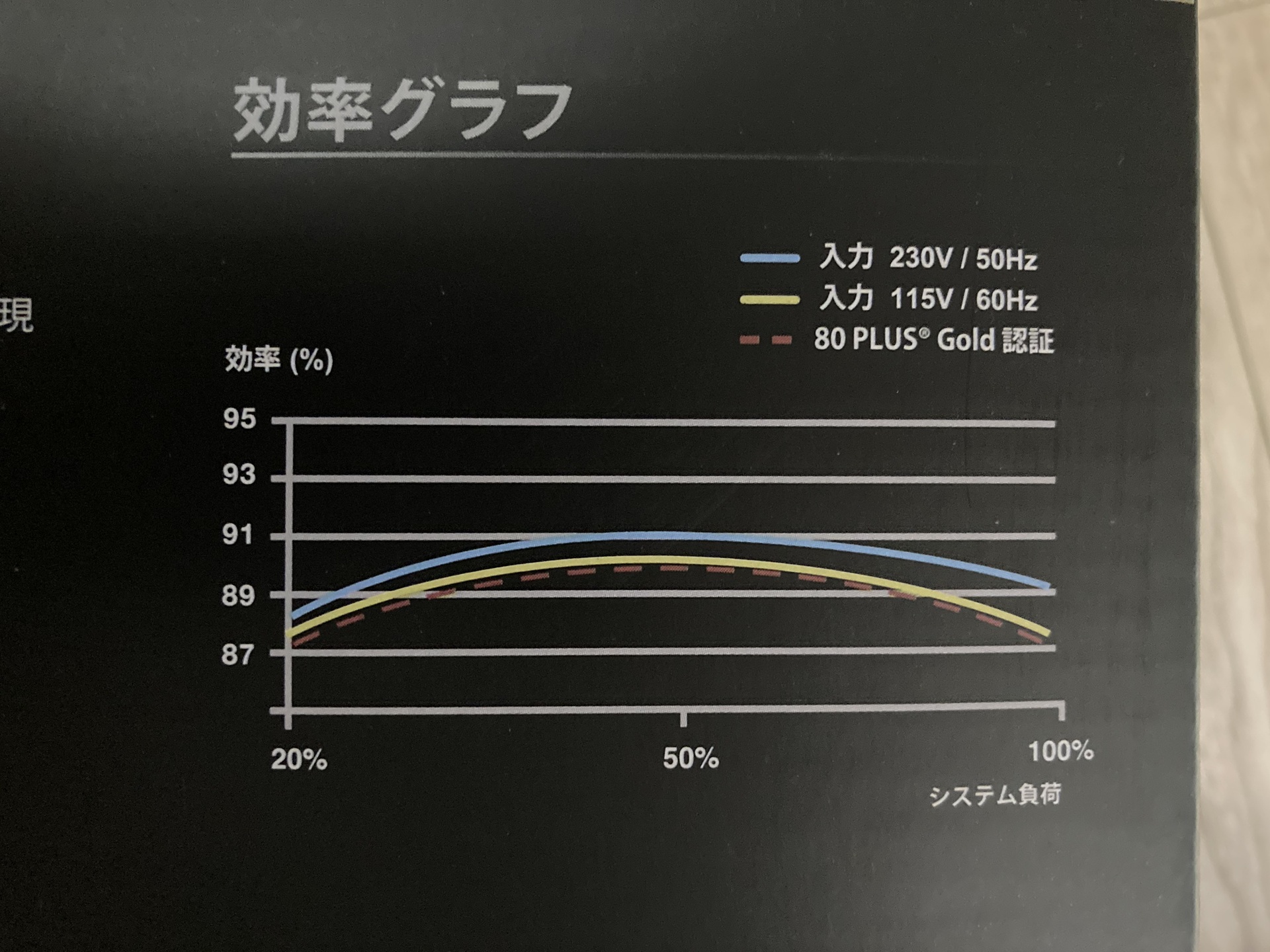
Based on these specifications, I selected and replaced it with the same product featuring a 650W capacity, 80PLUS GOLD certification, and support for the latest ATX 3.1 standard, ensuring that the approx. 300W full-load consumption would correspond to the peak of the efficiency curve at “50% load."
Identifying the Cause
After reconnecting all wiring to the newly purchased power supply unit and running a boot test, the BIOS booted up on the first try as if the previous malfunctions were a lie, and the screen output normally. With the results of this replacement test, I was able to completely confirm that the cause of the PC malfunction—which had reached a dead end due to lacking a spare power supply—was indeed “deterioration of the power supply unit."
Summary
The phenomenon occurred where the PC fans spun but no image appeared on the screen, and it could not be recovered by re-seating memory or clearing the CMOS. Since my home spare power supply lacked a GPU 8-pin connector and verification was impossible, I suspected the power supply by elimination and newly purchased and replaced it with the “ASRock PRO-650G" (650W capacity, which achieves peak efficiency—90% at 50% load—on the graph on the back of the product box for a 300W full load). As a result, I achieved a successful normal boot on the first try, identifying that the cause of the malfunction was the deterioration of the old power supply “Goriki-Dan 2" purchased in 2021. By updating to the latest GOLD certification standard, I was able to build a stable environment with power-saving performance surpassing Bronze, alongside low heat generation and quiet operation enabled by an ideal load factor.