Building a Tetris-Style Game with MicroPython and RP2040-Zero
In this article, we introduce a Tetris-style game program implemented in MicroPython using ChatGPT, an RP2040-zero, and an SSD1306 OLED display.
The program implements features such as block dropping, left/right movement, rotation (with wall kicks), line clearing, and game-over detection.
Below, we explain the implementation details and design choices for each function.
https://github.com/bomura/blocks-fall
Overall Game Structure and Settings
Hardware and Display Settings
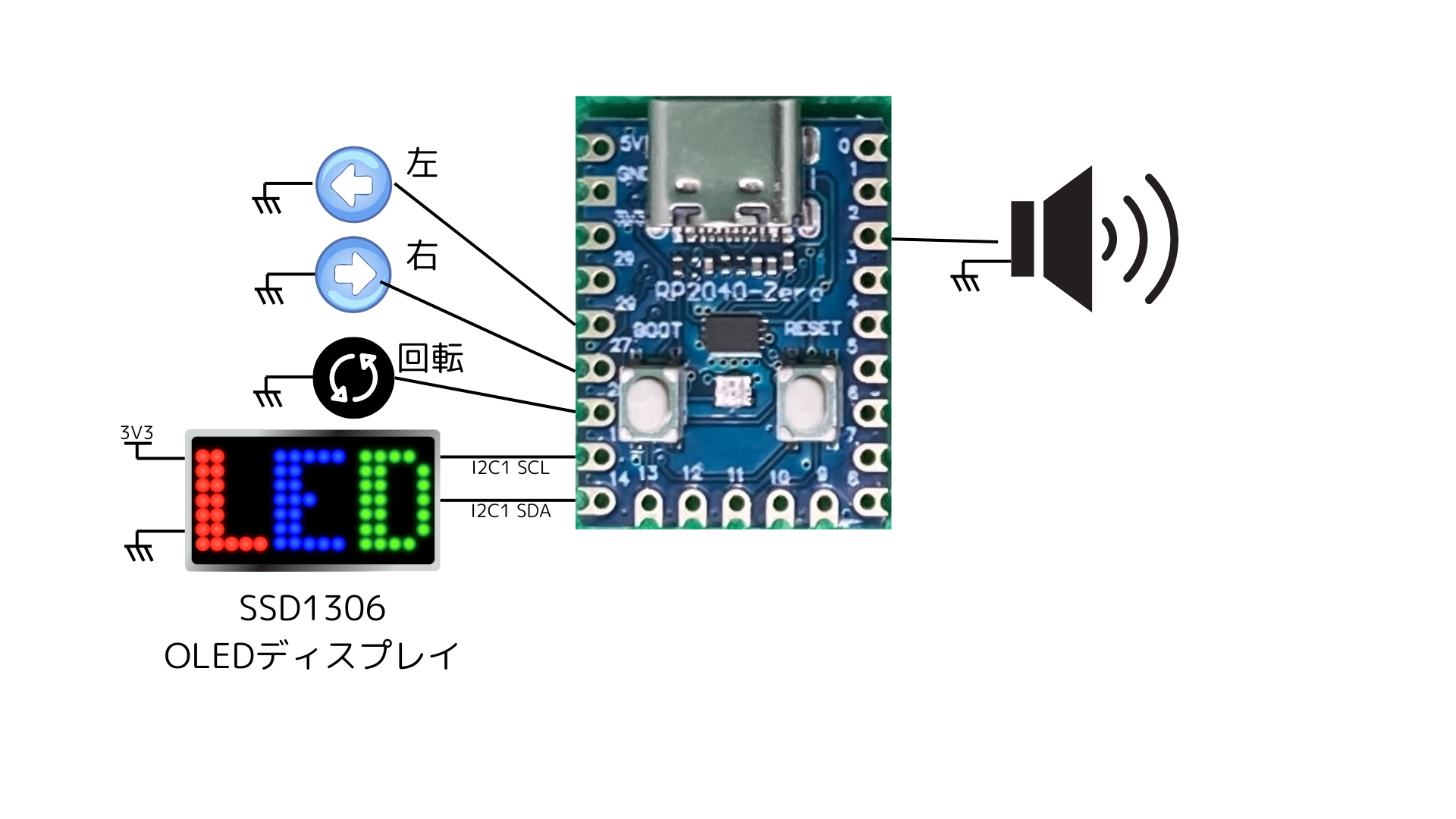
- Connected the SSD1306 display via I2C communication.
- To match the screen orientation, the logical size of the display is set to
DISPLAY_WIDTH = 32andDISPLAY_HEIGHT = 128, dividing the screen into a UI area and a game area. - The UI area is on the left side (x-coordinates 0–7) to display the score and the next block, while the remaining portion serves as the gameplay area.
- On our display, the UI area is orange, and the gameplay area is blue.
Game Field Settings
- Block size is set as
BLOCK_SIZE = 3. - The game field logically forms a grid of
FIELD_ROWS×FIELD_COLS, with each cell rendered as 3 × 3 pixels.
Block Definitions
In the BLOCKS dictionary, the shape of each block (I, U, t, S, Z, J, L) is defined as a list of coordinates for each rotation state.
This makes it easy to handle different block shapes for each rotation.
Block Shape Definitions (Per Rotation State)
BLOCKS = {
    'I': [
        [(0, 1), (1, 1), (2, 1), (3, 1)],
        [(2, 0), (2, 1), (2, 2), (2, 3)],
        [(0, 2), (1, 2), (2, 2), (3, 2)],
        [(1, 0), (1, 1), (1, 2), (1, 3)]
    ],
    'U': [
        [(0, 0), (0, 1), (0, 2), (1, 0), (1, 2)],
        [(0, 0), (0, 1), (1, 0), (2, 0), (2, 1)],
        [(0, 0), (0, 2), (1, 0), (1, 1), (1, 2)],
        [(0, 0), (0, 1), (1, 1), (2, 0), (2, 1)]
    ],
    'T': [
        [(0, 1), (1, 0), (1, 1), (1, 2)],
        [(0, 1), (1, 0), (1, 1), (2, 1)],
        [(0, 0), (0, 1), (0, 2), (1, 1)],
        [(0, 1), (1, 1), (1, 2), (2, 1)]
    ],
    'S': [
        [(0, 1), (0, 2), (1, 0), (1, 1)],
        [(0, 0), (1, 0), (1, 1), (2, 1)]
    ],
    'Z': [
        [(0, 0), (0, 1), (1, 1), (1, 2)],
        [(0, 1), (1, 0), (1, 1), (2, 0)]
    ],
    'J': [
        [(0, 0), (1, 0), (1, 1), (1, 2)],
        [(0, 1), (1, 1), (2, 0), (2, 1)],
        [(0, 0), (0, 1), (0, 2), (1, 2)],
        [(0, 0), (0, 1), (1, 0), (2, 0)]
    ],
    'L': [
        [(0, 0), (0, 1), (1, 0), (2, 0)],
        [(0, 0), (1, 0), (1, 1), (1, 2)],
        [(0, 1), (1, 1), (2, 0), (2, 1)],
        [(0, 0), (0, 1), (0, 2), (1, 2)]
    ]
}
Explanation of Functions
can_move(piece, drow, dcol)
This function checks whether the falling block, when moved by the specified offsets (drow, dcol):
- Goes out of the game field boundaries
- Collides with already fixed blocks
It returnsTrueif the move is valid andFalseotherwise, so it is always called during block movement and rotation processing.
Check if the falling block can move by the specified offsets (drow, dcol)
def can_move(piece, drow, dcol):
    for (dr, dc) in piece['shape']:
        new_row = piece['row'] + dr + drow
        new_col = piece['col'] + dc + dcol
        if new_col < 0 or new_col >= FIELD_COLS or new_row < 0 or new_row >= FIELD_ROWS:
            return False
        if game_field[new_row][new_col]:
            return False
    return True
3.2. fix_piece(piece)
When a block can no longer fall downwards, it fixes the block to the game field at its current position.
After fixing, it sets “1" in the corresponding cells of the game field so they are treated as stationary blocks thereafter.
Fix the falling block to the game field
def fix_piece(piece):
    for (dr, dc) in piece['shape']:
        r = piece['row'] + dr
        c = piece['col'] + dc
        if 0 <= r < FIELD_ROWS and 0 <= c < FIELD_COLS:
            game_field[r] = 1
3.3. spawn_piece()
This function generates a new block.
- Randomly selects a block type and rotation state from the
BLOCKSdictionary. - Determines the initial position (near the center of the field here) based on the width of the selected shape.
This function prepares the next block at the start of the game or after a block is fixed.
Generate a block
def spawn_piece():
    word, shapes = random.choice(list(BLOCKS.items()))
    rotation = random.randint(0, len(shapes) - 1)
    shape = shapes[rotation]
    width = max(dc for (_, dc) in shape) + 1
    col = FIELD_COLS // 2
    return {
        'row': 0,
        'col': col,
        'word': word,
        'rotation': rotation,
        'shape': shape
    }
3.4. rotate_piece(piece)
Handles the block rotation process.
- Retrieves the shape after rotation and updates the current rotation state to the next one.
- However, rotating near edges can cause the block to clip into walls. Therefore, a wall kick process is implemented.
- Tests candidate offsets (e.g., shifting 1 to 2 cells left or right) in order and uses
can_moveto find a position without collisions. - If a valid position is found, that position and rotation state are finalized; otherwise, it reverts to the original state.
- Tests candidate offsets (e.g., shifting 1 to 2 cells left or right) in order and uses
Rotate the block, and perform wall kick processing to try offsets if it clips into walls
def rotate_piece(piece):
    shapes = BLOCKS[piece['word']]
    new_rotation = (piece['rotation'] + 1) % len(shapes)
    new_shape = shapes[new_rotation]
    # Offset candidates (e.g., shifting 1 or 2 cells left/right)
    offsets = [(0, 0), (0, -1), (0, 1), (0, -2), (0, 2)]
    original_row = piece['row']
    original_col = piece['col']
    for drow, dcol in offsets:
        # Temporarily apply new shape and offset
        piece['row'] = original_row + drow
        piece['col'] = original_col + dcol
        piece['shape'] = new_shape
        if can_move(piece, 0, 0):
            piece['rotation'] = new_rotation
            return  # Finalized since a valid position was found
    # If none of the offset candidates are valid, revert to original position and shape
    piece['row'] = original_row
    piece['col'] = original_col
3.5. clear_lines()
A function that checks each row in the game field and deletes rows where all cells are filled.
- Inserts empty rows at the top of the field corresponding to the number of deleted rows, shifting the blocks upward.
- Also adds to the score according to the number of cleared lines.
Function to delete lines
def clear_lines():
    """
    Check each row and delete rows where all cells are filled
    Add score based on the number of cleared rows and insert empty rows at the top
    """
    global game_field, score
    cleared_lines = 0
    new_field = []
    for row in game_field:
        if all(cell == 1 for cell in row):
            cleared_lines += 1
        else:
            new_field.append(row)
    for _ in range(cleared_lines):
        new_field.insert(0, [0] * FIELD_COLS)
    game_field = new_field
    score += 100 * cleared_lines
3.6. draw_ui(piece)
A function that draws the score and the next block preview in the UI area (left side of the screen).
- Uses
display.textto display the score and draws the next block as a smaller shape preview. - The next block actually receives the one generated by
next_piece.
Drawing the UI Area (Score, Next Block Placeholder)
def draw_ui(piece):
    display.fill_rect(0, 0, DISPLAY_HEIGHT, UI_WIDTH, 0)
    display.text("Score:%d" % score, UI_WIDTH+CELL_H, 0, 1)
    # Next block placeholder (expand to display actual next block as needed)
    for (dr, dc) in piece['shape']:
        x = dr * CELL_H
        y = dc * CELL_W
        display.fill_rect(x, y, CELL_W, CELL_H, 1)
3.7. draw_game_field(piece)
A function that draws the fixed blocks and the currently falling block in the game area.
- Draws each cell in the game field onto the display according to the specified cell size.
- The falling block is drawn at a position calculated by adding the shape offsets of each block to the current
rowandcol.
Drawing the Game Area (Fixed Blocks and Falling Block)
def draw_game_field(piece):
    """
    Drawing the game area (fixed blocks and falling block)
    Mapping: Game field (r, c) → Display coordinates
              x = r * CELL_H
              y = UI_WIDTH + c * CELL_W
    """
    display.fill_rect(0, UI_WIDTH, GAME_AREA_HEIGHT, GAME_AREA_WIDTH, 0)
    for r in range(FIELD_ROWS):
        for c in range(FIELD_COLS):
            if game_field[r]:
                x = r * CELL_H
                y = UI_WIDTH + c * CELL_W
                display.fill_rect(x, y, CELL_W, CELL_H, 1)
    for (dr, dc) in piece['shape']:
        r = piece['row'] + dr
        c = piece['col'] + dc
        x = r * CELL_H
        y = UI_WIDTH + c * CELL_W
        display.fill_rect(x, y, CELL_W, CELL_H, 1)
Game Loop and Overall Flow
- Input Processing: Monitors inputs from the left/right movement buttons and rotation buttons, calling
can_moveandrotate_pieceappropriately to move or rotate blocks. - Dropping Process: Drops the block down by one row at regular intervals; if it cannot move, it fixes it using
fix_piece. - Line Clearing and Next Block Generation: After fixing a block,
clear_lineschecks for lines, andspawn_piecegenerates the next block. - Game Over Detection: If a block exists at the very top of the field after fixing, it triggers a game over and displays the final score and “GAME OVER".
References
[sky] Tetris Theme BGM Korobeiniki Doremi Sheet Music – co sky
How to Sound a BEEP | Arduino Robot Programming | Qumcum Learning Plaza
Conclusion
In this program, we used MicroPython and the SSD1306 to implement core Tetris-style features (block dropping, movement, rotation, line clearing, and game-over detection).
In particular, wall kicks during rotation are an important technique for achieving natural behavior even near edges.
Based on this program, feel free to add further features (fast dropping, enhanced rotation algorithms, score bonuses, etc.) to complete your own original Tetris-style game!