A Reliable Workflow for n8n and Gmail Integration: Preventing Missed Emails When Receiving Multiple Messages
In daily operations, there are numerous scenarios where automated emails—such as system alerts or automatic notifications from e-commerce sites (e.g., Mercari listing and shipping notifications)—need to be managed as tasks. However, when manually checking emails and copying them over to a task management tool, there is always a risk that they get buried under other messages, leading to delayed responses or complete oversight.
Building an Automated Task Registration Infrastructure in a Secure Environment
To resolve this issue, we can utilize the open-source workflow automation tool “n8n" to build a mechanism that automatically registers emails meeting specific conditions into a task management system.
Specification Limits of Standard Triggers and the Pitfalls of Parallel Processing
When detecting incoming emails in n8n, the simplest approach is to use the Gmail Trigger. However, this node has a limitation in its specifications. If multiple target emails are received within the 1-minute polling interval, only the latest single email is fetched, and the remaining emails are left unprocessed, causing a “missed email" phenomenon.
To avoid this, a common approach is to “batch-fetch unread emails and mark them as read after processing." However, because Gmail’s read status is global, this adversely affects mailers used by humans and other systems. Furthermore, passing multiple fetched items into subsequent processing all at once creates concerns about inverted processing orders due to packet delays or triggering API rate limits (429 Too Many Requests) on the destination server.
Robust Workflow Design Using Label Management and Sequential Loop Processing
To solve these challenges, we designed a workflow that combines state management independent of the read status with reliable, one-by-one processing.
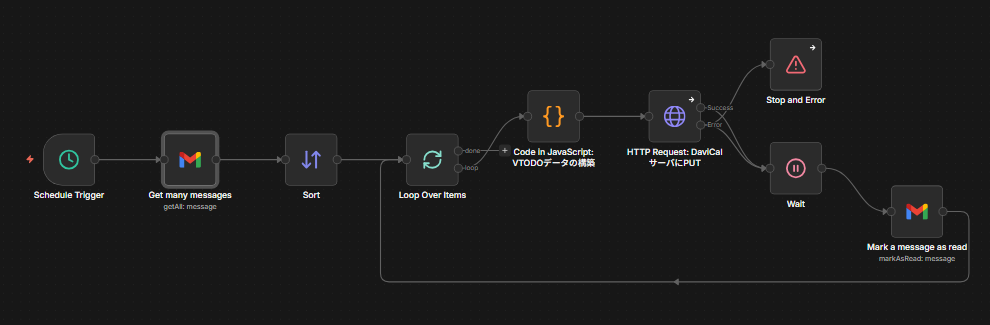
Preparation (Gmail Filter Settings)
Create a filter in Gmail settings that automatically assigns a dedicated label (e.g., n8n-todo) to target emails. This completely delegates the email filtering process to Gmail.
An example of the search criteria to set is as follows:
from:no-reply@example.com subject:(Notification OR Alert)
Schedule Trigger and Fetching Target Emails
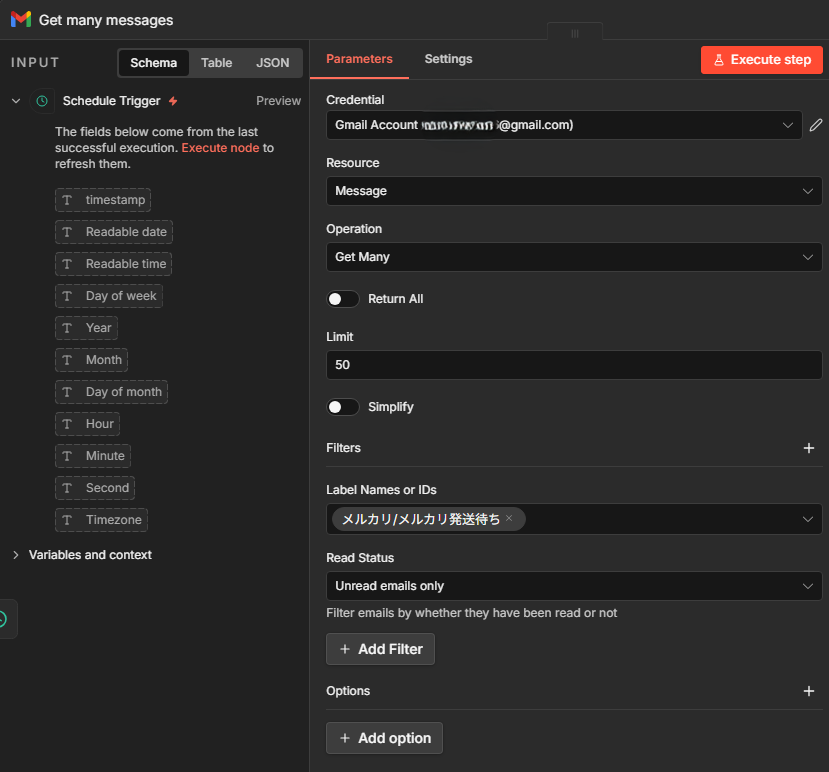
On the n8n side, use a “Schedule Trigger" that executes every minute, and fetch unprocessed emails as an array using the “Gmail" node (Get Many operation) with the following query specified.
 Filters
Label:n8n-todo
Read Status: Unread emails only
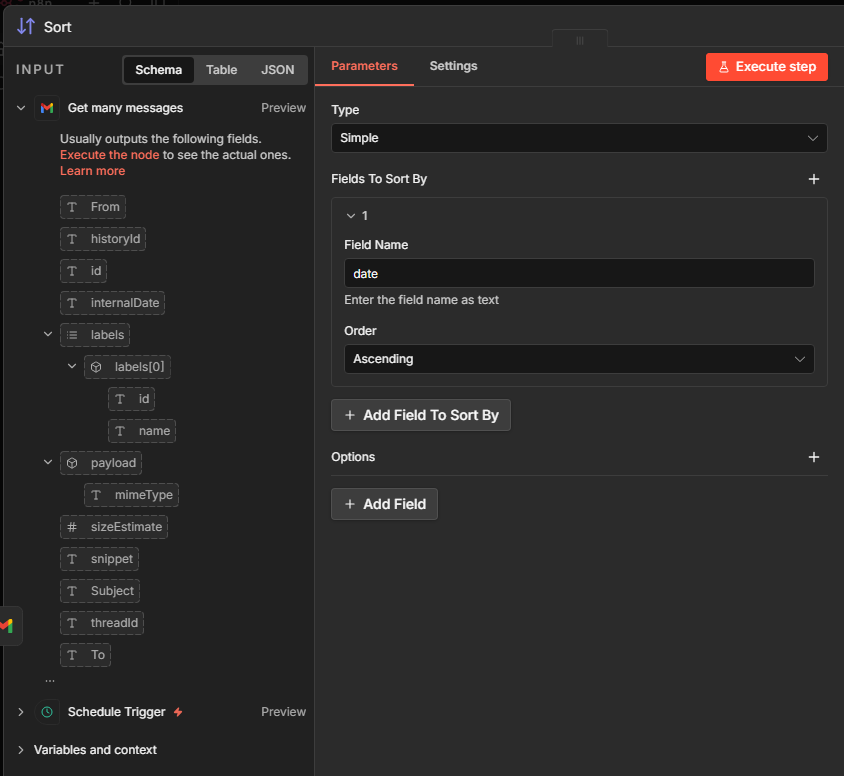
Ascending Sort
Because the Gmail API returns results starting from the newest emails, use a “Sort" node or a “Code" node to sort them in ascending order (oldest first) based on the internal timestamp (internalDate). This ensures that emails are processed in the order they were received.
Sequential Processing via Loop Node
Add a “Loop" node and set the Batch Size to 1. This ensures that the arrayed email data is passed to subsequent processing strictly one by one in order.
In this setup, tasks are registered to DAViCal (calendar server) by specifying the following in an HTTP Request. Task registration to DAViCal (via PUT requests using the HTTP Request node) is also safely executed one by one.
https://davical.example.com/caldav.php/user/tasks/task-12345.ics
Wait and Read Flag
Every time the processing of a single item finishes, mark the corresponding email as read using the “Gmail" node (Mark as Read operation) again. This acts as a completion flag, excluding it from future polling targets.
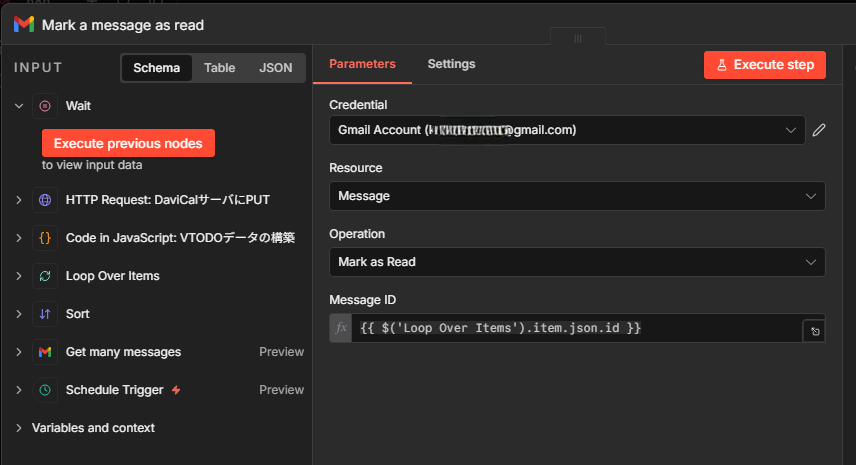
Completion of a Stable Automation System
With this design, even if a large number of notification emails are received simultaneously, an environment is established where tasks are reliably created from oldest to newest without missing any. Because only completed tasks are progressively marked as read, even if a communication error or similar issue occurs on the n8n side to interrupt processing, the target emails remain unread. As a result, an extremely robust and fail-safe system is realized that automatically retries during the next polling cycle.
Summary
When turning email notifications into tasks, overlooked processing and missed messages caused by receiving multiple emails due to n8n’s standard trigger specifications were major challenges. To address this, we implemented unread email retrieval via Schedule Trigger, sequential processing using a Loop node, and marking emails as read (completion management) by removing the UNREAD label. As a result, we established a robust workflow that prevents server overload and out-of-order processing, reliably and automatically registering tasks without missing any.