Automating PaperMC Plugin Releases with GitHub Actions
I set up an environment at home to practice running the PDCA cycle through Minecraft, and as a supportive tool for that, I created a whiteboard plugin.
- Learning the PDCA Cycle in Minecraft: Fostering Critical Thinking While Playing
- How to Set Up a Minecraft Server: A Guide to Setting Up a Paper Server for Learning with Kids
Honestly, if you’re just running the PDCA cycle for yourself, publishing to a distribution site isn’t strictly necessary. However, with the mindset of “since I went through the trouble of making it, let’s publish it so others can use it too," I set up a distribution pipeline. Specifically, I made it possible to publish directly to Hangar (PaperMC’s official distribution site) using just GitHub Actions, creating a workflow that allows me to focus on improving the README and taking screenshots from now on.
Tools and Versions
| Element | Version | Role |
|---|---|---|
| Java (JDK) | 21 | Mandatory requirement for Paper 1.20.5 and later. Unified to JDK 21 for both local and CI environments. |
| Gradle (Wrapper) | 9.1.0 | Java build automation tool. Automates building and publishing. Make sure to commit gradle/wrapper/gradle-wrapper.jar. |
| Paper | 1.21.9 | Minecraft server |
| GitHub | — | Java source repository, Issue management, Release management. |
| GitHub Actions | — | Automated build & publishing (push → Snapshot, tag → Release). Stores HANGAR_API_TOKEN in Secrets. |
| Hangar | — | PaperMC’s official plugin distribution site. Used for Project creation, Channel setup (color required for Snapshot), and API Key generation. |
| Hangar API key | — | Used by GitHub to upload plugin files to Hangar. Registered as HANGAR_API_TOKEN in GitHub repository Secrets. |
What You Will Gain From This Article (Overview)
- Creating a project on Hangar and publishing the plugin
- Generating an API Key on Hangar and saving it to GitHub Repository Secrets
- Placing necessary files in the GitHub repository (correct location for plugin.yml, committing the Gradle Wrapper JAR)
- Using GitHub Actions for:
- Pushing to
main→ Automatic Snapshot publication - Pushing a
v*tag → Automatic Release publication
- Pushing to

 https://hangar.papermc.io/nando256/whiteboard
 https://github.com/nando256/whiteboard
Step 1: Initial Setup on Hangar
- Create Project
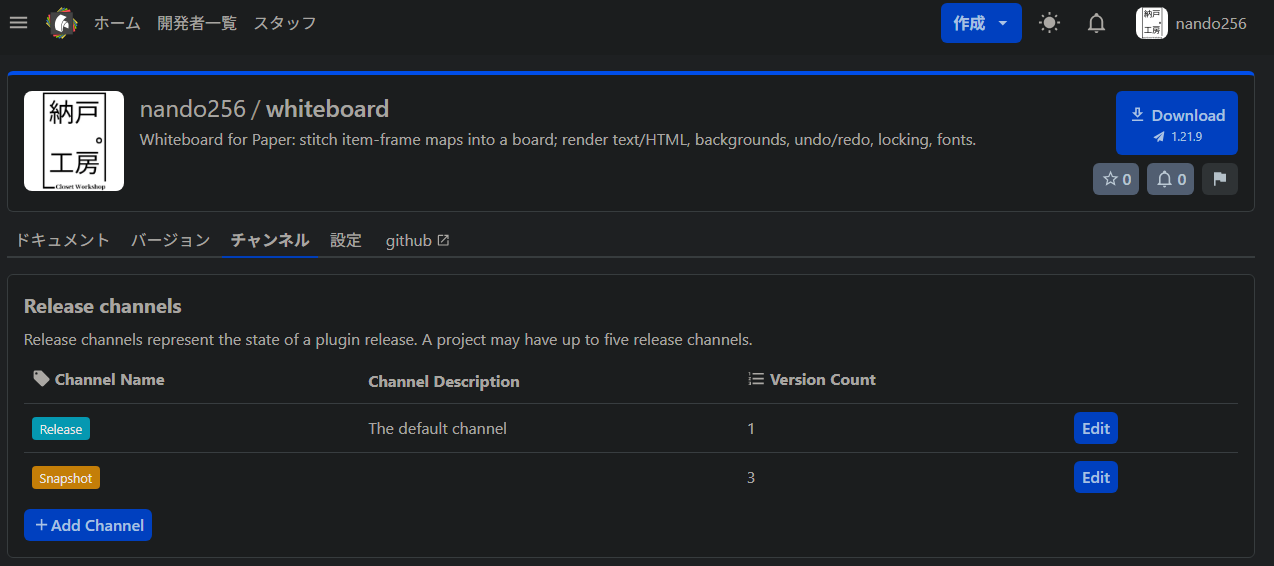
Determine the name and slug to create it (will be used later in Gradle’sid.set(“")). - Add Channel (Snapshot) *The Release channel exists by default
Projects → Channels → New
Name: Snapshot, make sure to select a Color (without a color, it will fail via API with …noColor).

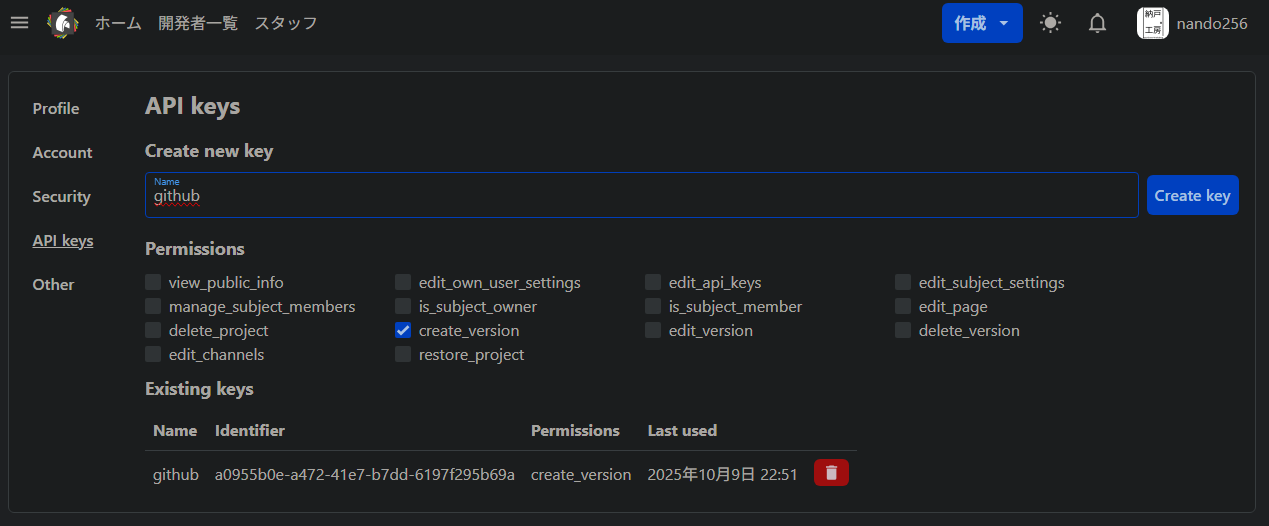
- Generate API Key
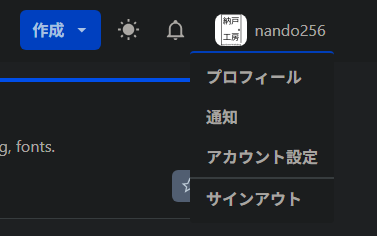
Account Settings → API Keys → Create
Save it later in GitHub Secrets (do not hardcode it in the repository).


Step 2: Minimum GitHub Repository Structure
whiteboard/
├─ build.gradle.kts
├─ settings.gradle.kts
├─ gradle/wrapper/gradle-wrapper.jar   ← ★ Make sure to commit the JAR as well
├─ gradle/wrapper/gradle-wrapper,properties
├─ gradlew / gradlew.bat                             ← gradlew requires execute permission (+x)
├─ src/main/java/net/nando256/whiteboard/WhiteboardPlugin.java
└─ src/main/resources/plugin.yml                     ← ★ Place here (do not put directly under root)
plugin.yml
// build.gradle.kts (Excerpt)
import io.papermc.hangarpublishplugin.model.Platforms

plugins {
    java
    id("io.papermc.hangar-publish-plugin") version "0.1.3"
}

group = "net.nando256"
// Use version.override if supplied from CI, otherwise use local default
version = (findProperty("version.override") as String?) ?: "0.0.0-local"

java { toolchain.languageVersion.set(JavaLanguageVersion.of(21)) }

repositories {
    mavenCentral()
    maven("https://repo.papermc.io/repository/maven-public/")
}

dependencies {
    compileOnly("io.papermc.paper:paper-api:1.21.9-R0.1-SNAPSHOT")
}

// Expand ${version} in plugin.yml using Gradle's version
tasks.processResources {
    filesMatching("plugin.yml") { expand("version" to project.version) }
}

hangarPublish {
    publications.register("plugin") {
        id.set("whiteboard")                         // ← Hangar project slug
        version.set(project.version.toString())
        channel.set(providers.gradleProperty("hangar.channel").orElse("Snapshot"))
        apiKey.set(System.getenv("HANGAR_API_TOKEN"))
        platforms {
            register(Platforms.PAPER) {
                jar.set(tasks.jar.flatMap { it.archiveFile })
                platformVersions.set(listOf("1.21.9")) // Multiple versions can be specified
            }
        }
    }
}
Step 4: GitHub Actions (push = Snapshot / tag = Release)
.github/workflows/publish.yml
name: Publish to Hangar

on:
  push:
    branches: [ "main" ]
    tags: [ "v*" ]

jobs:
  build-and-publish:
    runs-on: ubuntu-latest
    steps:
      - uses: actions/checkout@v4

      - name: JDK 21
        uses: actions/setup-java@v4
        with:
          distribution: temurin
          java-version: 21

      - name: Gradle
        uses: gradle/actions/setup-gradle@v4

      - name: Determine channel & version
        id: meta
        run: |
          if [[ "${GITHUB_REF}" == refs/tags/* ]]; then
            echo "channel=Release" >> $GITHUB_OUTPUT
            echo "version=${GITHUB_REF#refs/tags/v}" >> $GITHUB_OUTPUT
          else
            echo "channel=Snapshot" >> $GITHUB_OUTPUT
            echo "version=0.0.0-${GITHUB_SHA::7}-SNAPSHOT" >> $GITHUB_OUTPUT
          fi

      - name: Build
        run: ./gradlew -q clean build

      - name: Publish to Hangar
        env:
          HANGAR_API_TOKEN: ${{ secrets.HANGAR_API_TOKEN }}
        run: |
          ./gradlew \
            -Phangar.channel=${{ steps.meta.outputs.channel }} \
            -Pversion.override=${{ steps.meta.outputs.version }} \
            publishPluginPublicationToHangar
Registering Secrets
GitHub → Settings → Secrets and variables → Actions → New repository secret
- Name: HANGAR_API_TOKEN
- Value: (API Key generated on Hangar)
Operational Rules (Just Remember These)
- During Development: Push to
main→ Automatically published as a Snapshot (0.0.0--SNAPSHOT) - For Release:
git tag v0.1.0 && git push --tags→ Automatically published as a Release - Version Name Conflicts: Hangar does not allow duplicate names even across different channels. If a conflict occurs, bump the tag or delete the older version.
Common Issues and Quick Fixes
- version.new.error.channel.noColor
→ Create the Snapshot channel via the UI and “assign a color" - version.new.error.duplicateNameAndPlatform
→ A version with the same name already exists. Avoid collisions by including the SHA for Snapshots and using tags for Releases. - Unable to access … gradle-wrapper.jar
→ Wrapper JAR is not committed. Review.gitignoreand rungit add -f gradle/wrapper/gradle-wrapper.jar - Build/Startup Failure
→ Assumes Java 21 (fix both local and CI to 21), ensureplugin.ymlis undersrc/main/resources/
Conclusion (Leave Publishing to Automation, Focus Entirely on Creation)
Publishing isn’t strictly required to run a PDCA cycle. However, putting what you’ve made out into the world might help others learn and play.
Following the steps in this article, distribution is reduced to just pushing or tagging, leaving you with more time to spend on READMEs, screenshots, and feature improvements. It takes very little effort while delivering huge benefits—that’s what building this distribution pipeline is all about.