Surface Pro 5 (Model 1796) is Painfully Slow! Could the Cause Be Clock Throttling Due to a Failing Battery?
My usually smooth-running Surface Pro 5 (model 1796) suddenly became “painfully slow" overnight. App launches take forever, and the perceived processing speed has dropped to the point where even web browsing is a struggle. To investigate the cause, I checked the system status.
Investigating the Cause and Finding Clues for a Solution
- Why is there such a severe performance drop that makes working impossible?
- I want to verify if battery-related issues are specifically involved and outline a potential solution.
The goal is to provide users suffering from the same symptoms with “cause isolation" and “material to help them decide whether to repair or replace."
CPU Clock is Stuck at 0.39GHz
Checking the “Performance" tab in Task Manager revealed that:
- The CPU, which should normally operate at 2.5GHz,
- was stuck at an extremely low frequency of 0.39GHz.
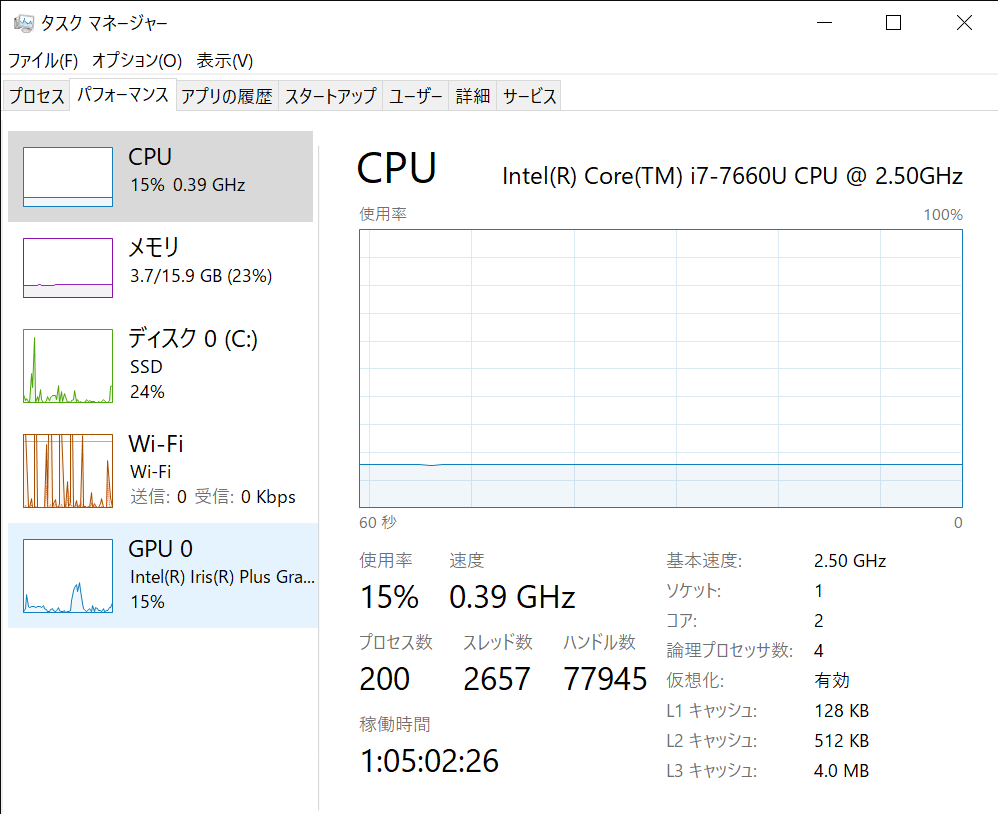
At this point, it seems highly likely that this is a “performance restriction caused by hardware control rather than an OS or application issue."
Impact of a Non-Charging Battery
With this Surface Pro 5, the battery stopped charging some time ago, and it has consistently shown 0–1%.
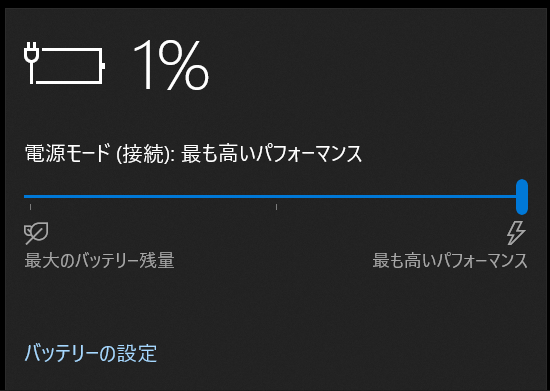
Surface devices are known to exhibit the following behaviors when the battery degrades significantly:
- Automatically switches to power-saving mode for safety
- CPU clock is forcibly throttled (fixed at 0.39GHz)
- Performance fails to peak even when the AC adapter is plugged in
Since these characteristics match my current symptoms, I suspect that a battery malfunction is likely one of the causes. However, this cannot be definitively concluded at this stage and remains a “strong hypothesis."
Future Plan: DIY Battery Replacement Using an AliExpress Part
I have already ordered a replacement battery on AliExpress and am currently waiting for delivery.
As a next step, I plan to actually replace the battery and verify whether this is the root cause.
- Official repair is expensive and likely results in a device exchange
- Third-party repair shops cost around 30,000 yen
- DIY replacement carries risks but keeps costs down
Given these circumstances, I decided to first try replacing it myself and see if any improvements are made.
How Can It Be Fixed?
- Battery Replacement
→ A permanent fix requires replacing it with a new battery. While official repairs are expensive, other options include third-party repair shops or DIY replacement. - Almost No Temporary Workarounds
→ Power settings on Surface devices are strictly locked down on the hardware side, with no settings available other than the “Balanced" plan. I tried using a trick to unlock the “Ultimate Performance" plan, but it did not appear. - If Continued Use is Difficult
→ Upgrading to a newer model is also worth considering.
- How to enable “Ultimate Performance"
Enter the following command in PowerShell
powercfg -duplicatescheme e9a42b02-d5df-448d-aa00-03f14749eb61
Conclusion: Is the Surface Pro 5 “Painfully Slow" Issue Due to Battery-Induced Clock Throttling?
- Symptoms: Constantly agonizingly slow, CPU clock fixed at 0.39GHz
- Status: Battery won’t charge, stuck at 0-1% display
- Future Plan: Plan to replace the battery purchased from AliExpress myself and identify the cause
- Solution: Depending on the results, decide whether to repair, replace, or buy a new one
This case taught me that before concluding “the PC itself is broken," it is necessary to check whether the battery is acting as a system bottleneck. If you happen to own a Surface that suddenly became painfully slow in the same way, I recommend checking your CPU clock and battery status first.