KiCad Freerouting Plugin Java Version Detection Error and Countermeasures
When I launched KiCad the other day for the first time in a while, I noticed that the KiCad version had been updated to v9.0.0. I updated to the latest version without thinking much about it, but I ran into an issue with the Freerouting plugin, so I’m sharing it here.
Installing the Freerouting Plugin
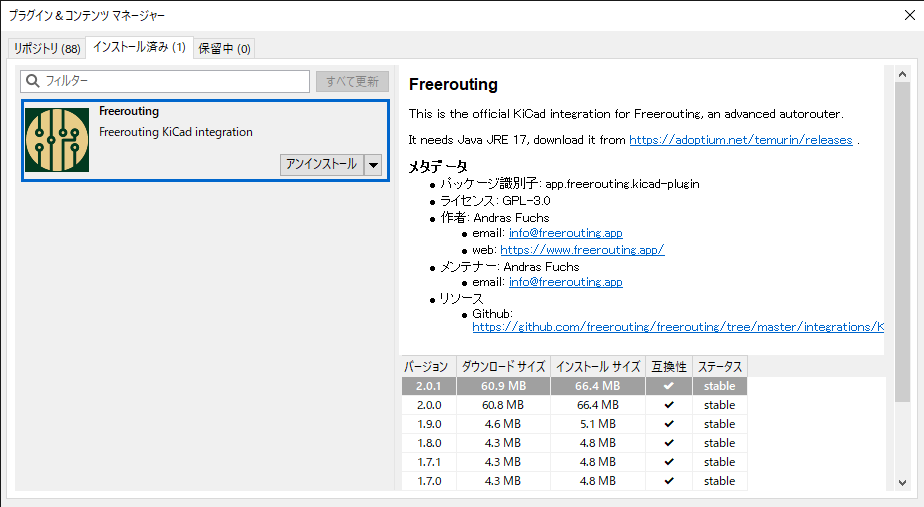
- Select “Plugin and Content Manager" from the KiCad home page.
- Type “Freerouting" into the filter.
- Click the Install button for Freerouting, click “Apply Pending Changes" at the bottom right, and complete the installation. Verify that it is registered as installed.

Issue After Version Upgrade
Due to the version upgrade, the Freerouting plugin I had been using previously was no longer installed, so I reinstalled it. However, after installing the plugin and trying to use Freerouting, the following error message started appearing.
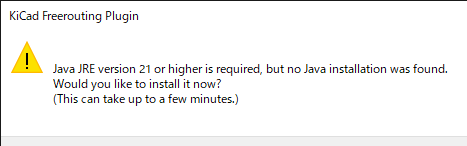
“Java JRE version 21 or higher is required …"
This error occurs when the plugin checks the Java version internally. Even though Java 21 was actually installed correctly on my environment, the plugin incorrectly determined that the version was insufficient.
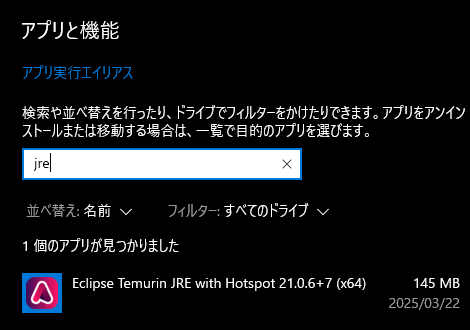
Cause of Error and Investigation
As I investigated further, I found that the cause of the problem lies in the version check process within the Python script. Specifically, the plugin retrieves the Java version using a function like the one below.
The file is located at C:\Users\<USER>\Documents\KiCad\9.0\3rdparty\plugins\app_freerouting_kicad-plugin\plugin.py
In the code above, the java -version command is executed using subprocess.check_output(). However, issues around subprocess.check_output prevented it from obtaining the correct version information.
The output of java -version looks like this, and the first line contains the accurate version information:
Solution
I tried trial and error to figure out how to modify it so that it could retrieve the correct Java version, but in conclusion, it didn’t go well. Giving up, I implemented a temporary workaround: forcing get_java_version() to return "21.0.6" so that it would work. However, for future compatibility and support for other versions, it is preferable to fix the implementation to correctly extract the version information.
Example of Modified Code
Below is an example of the modification reflecting the improvements mentioned above.
def get_java_version(javaPath):
    try:
         # May malfunction if the path contains spaces
         javaInfo = subprocess.check_output(javaPath + ' -version', shell=True, stderr=subprocess.STDOUT)
         javaVersions = [re.search(r'([0-9\._]+)', v).group(1).replace('"', '') for v in javaInfo.decode().splitlines()]
         for v in javaVersions:
             if v.split(".")[0].isdigit():
                 return v
    except:
         pass
    # Forcefully return 21.0.6
    return "21.0.6"
With this modification, "21.0.6" can be accurately extracted from the output of java -version, allowing the plugin to correctly recognize the actual version.
Conclusion
Sometimes unexpected errors occur when upgrading KiCad or reinstalling plugins. In this case, the issue stemmed from the version retrieval process inside the Python code.
I used a temporary workaround to forcefully return the version, but a fundamental solution has not been achieved. If anyone knows the correct way to fix this, please let me know.