Programming with Agents in Java Edition Minecraft: Reproduction Steps Using twbridge
In our previous article, "Reproducing the Minecraft: Education Edition “Block Coding × Agent (Working Robot)" Experience in Java Edition Minecraft," we outlined a concept to recreate the Education Edition’s block-coding and agent experience using a TurboWarp + WebSocket configuration.
In this article, based on that concept, we actually implemented it as a Paper plugin.
The plugin is named twbridge (TurboWarp Bridge). As the name suggests, it is a plugin that bridges TurboWarp and the Paper server.
The Goal: Java Edition with Agent Control via Code Blocks
Our objective is to allow children to experience “controlling a working robot (Agent) using block coding"—which they enjoyed in Minecraft: Education Edition—for “free" in the Java Edition (Paper) as well. To make it usable without installing mods on the client side, we adopted TurboWarp (a high-speed environment compatible with Scratch) and WebSockets. Commands are sent from TurboWarp’s extension blocks, received by the server-side plugin, and executed.
What Was Implemented This Time
In the current version, we have implemented the following blocks:
- WebSocket connection / disconnection
- Minecraft command sending (e.g., /say, etc.)
- Agent spawning / despawning
These can be loaded into TurboWarp as a custom extension (.js) served from the web server embedded within the plugin.
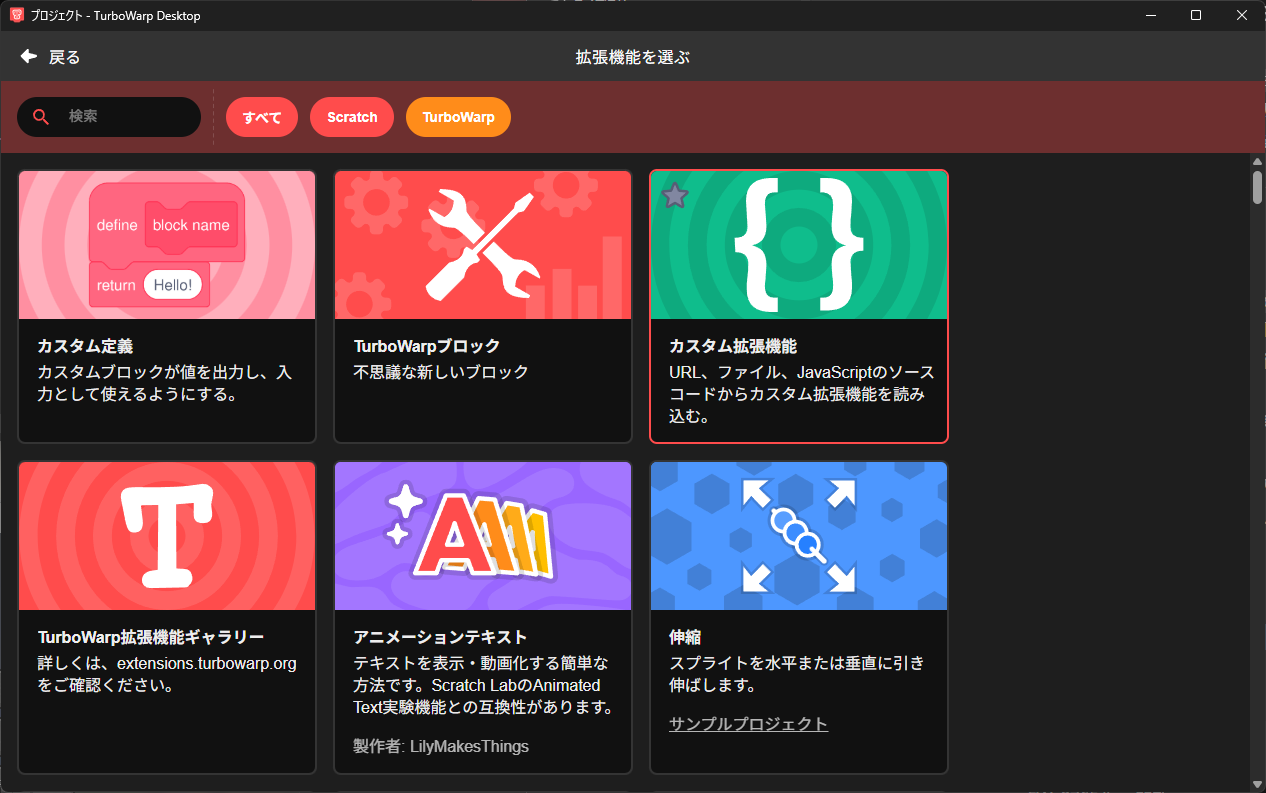
When you place twbridge.jar into your Paper server and start it up, the extension URL is displayed in the console. By specifying that URL on the TurboWarp side, the blocks become available. Once /say Hello from twbridge! is reflected on the server, you can experience firsthand that it is being controlled via the blocks.
Creating an Environment to Drive the PDCA Cycle Through “Blocks"
The ultimate goal of this project is to build an environment where children can learn the “PDCA cycle" within Minecraft.
Children assemble blocks to give instructions to the agent, observe the results, and make adjustments.
This directly corresponds to the Plan → Do → Check → Act cycle.
- Plan: Formulate an action plan using blocks
- Do: The agent executes it
- Check: Observe the results in the world
- Act: Modify the blocks and try again
We believe that by repeating this flow many times in a short period using “Block Coding × Agent," learners can naturally acquire the mindset of continuous improvement.
Future Challenges
Implementing this also revealed several challenges.
- Identification of multiple players
When multiple people are connected to the same server, it is necessary to specify which player’s agent is being controlled.
Currently, player names are registered and identified upon connection, but we want to implement more robust UUID management. - Command execution timing
Because TurboWarp evaluates blocks all at once, commands can sometimes get backlogged on the Minecraft side.
In the future, we would like to introduce queue processing to execute commands at regular intervals. - Security and permission management
Given that a WebSocket is opened, we are carefully considering the extent of permissions to grant.
For now, we are assuming operation in a closed environment such as a local network classroom.
Everything Handled Entirely on the Plugin Side
Based on these challenges, our design policy is to “keep everything self-contained within the Paper plugin."
There is no need to set up an external server or Node.js; introducing a single twbridge plugin ensures all of the following components are ready:
- WebSocket server (reception endpoint for commands from TurboWarp)
- Hosting of extension (.js) files
- Command execution and agent management within the Paper server
This has kept the setup to an absolute minimum.
Simply drop twbridge.jar into Paper’s plugins/ directory and restart. The TurboWarp extension URL will appear in the console, and you are ready to go by specifying that URL in TurboWarp’s “Add Extension" menu.
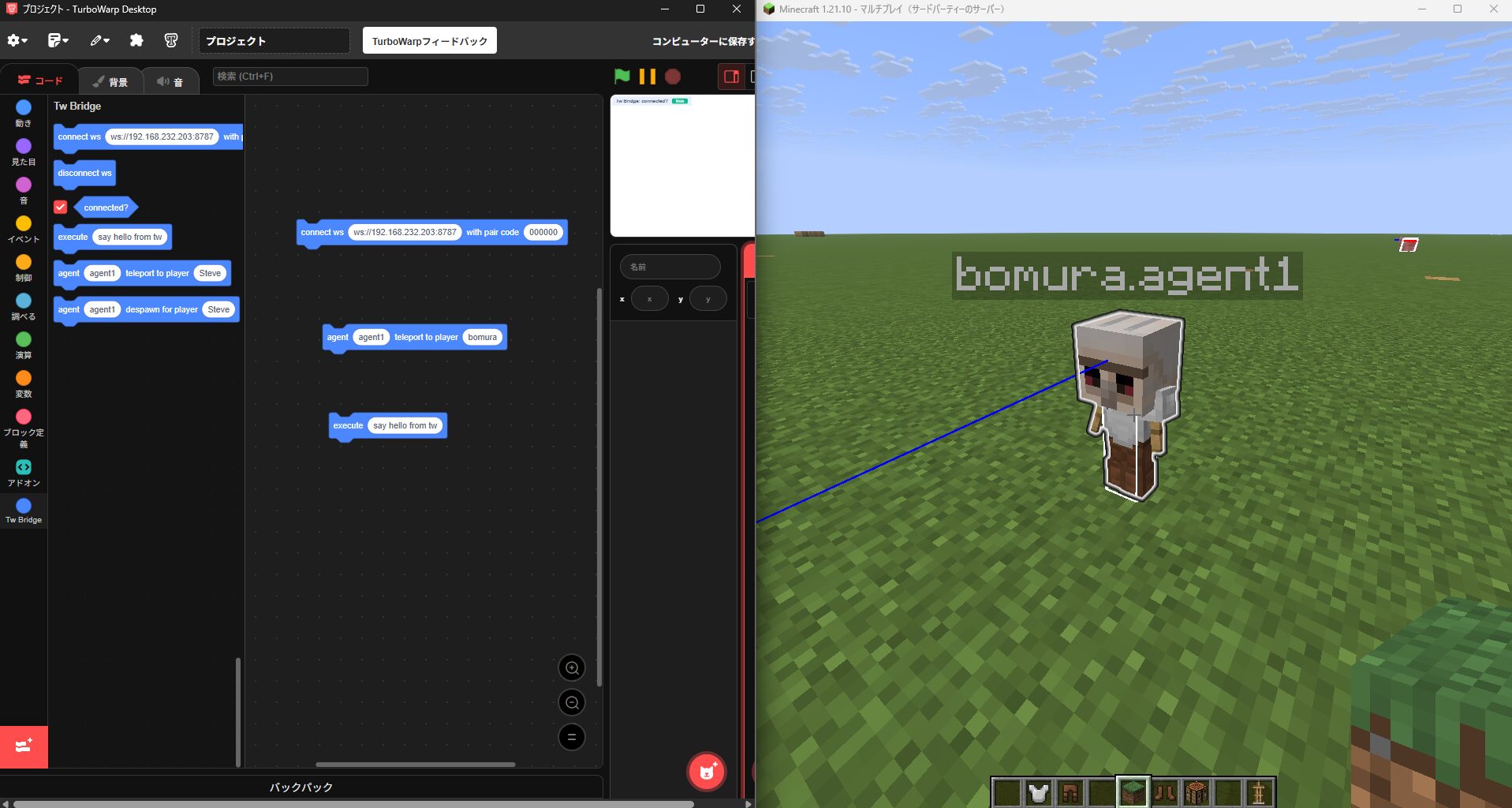
Future Expansion Plans
As our next steps, we plan to add the following blocks:
- Movement (forward, backward, vertical movement)
- Turning (turn right, turn left, 180° turn)
- Block manipulation (place / break)
- Conditionals and loops
- Block detection (ahead / below)
By implementing these step-by-step, we ultimately aim to achieve an operational feel close to MakeCode’s agent control blocks.
Furthermore, we are also conceptualizing “two-way communication" to send agent status back to the TurboWarp side via WebSockets.