Solving the Home Server SSL Problem: How to Avoid Certificate Conflicts Between OCI Nginx and Local OLS
The server architecture of our blog, “Nando Kobo," has evolved into its current form after overcoming several technical hurdles.
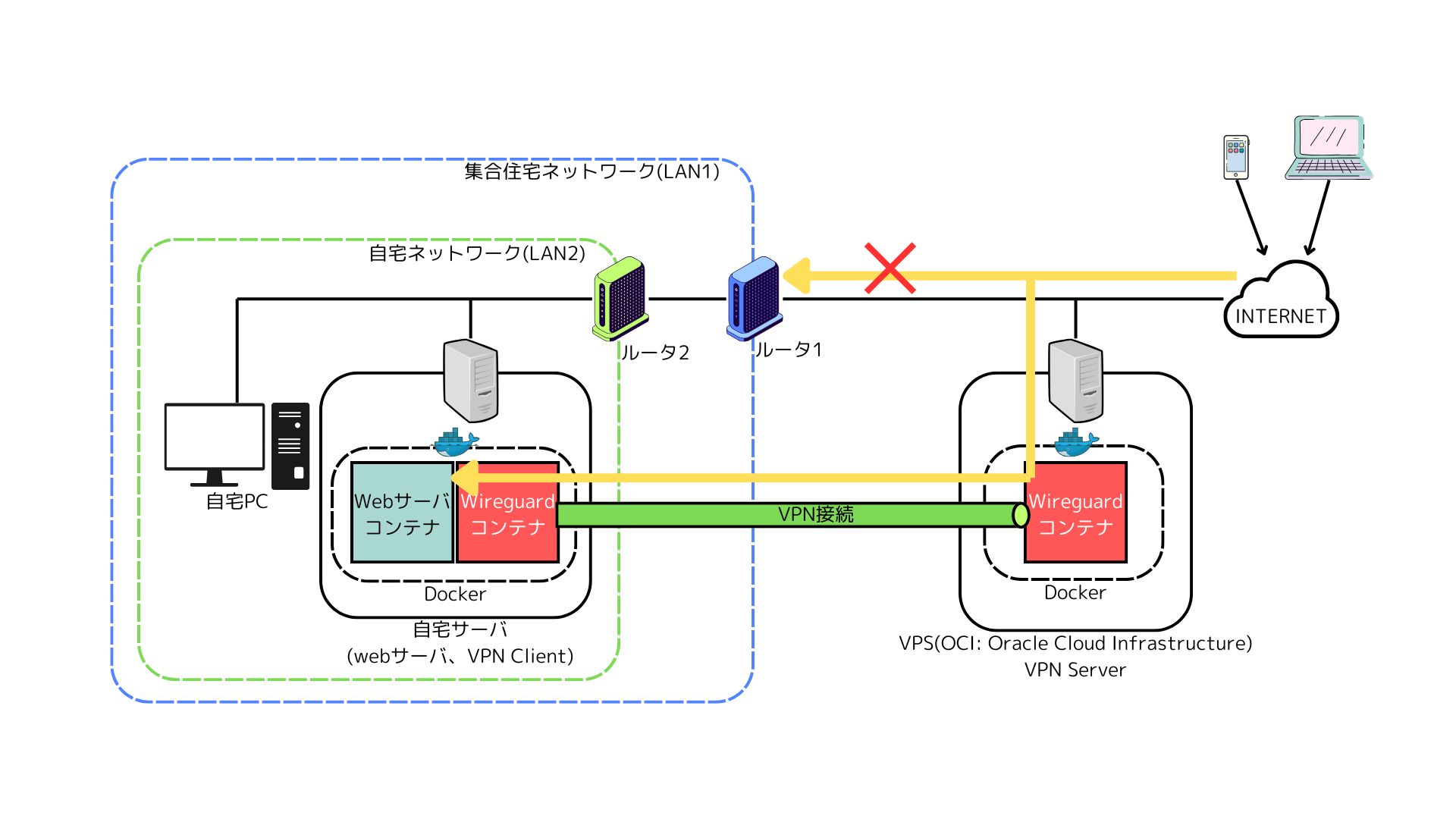
It started as a simple setup: WireGuard(OCI) -> OLS(local) -> WordPress. However, we hit our first roadblock right away. WireGuard’s iptables forwarding did not properly append the X-Forwarded-For header, which prevented QUIC.cloud integration—essential for WordPress speed optimization—from working correctly.
To solve this issue, we introduced Nginx as a reverse proxy on the OCI side, evolving the architecture to Nginx(OCI) — WireGuard -> OLS(local).
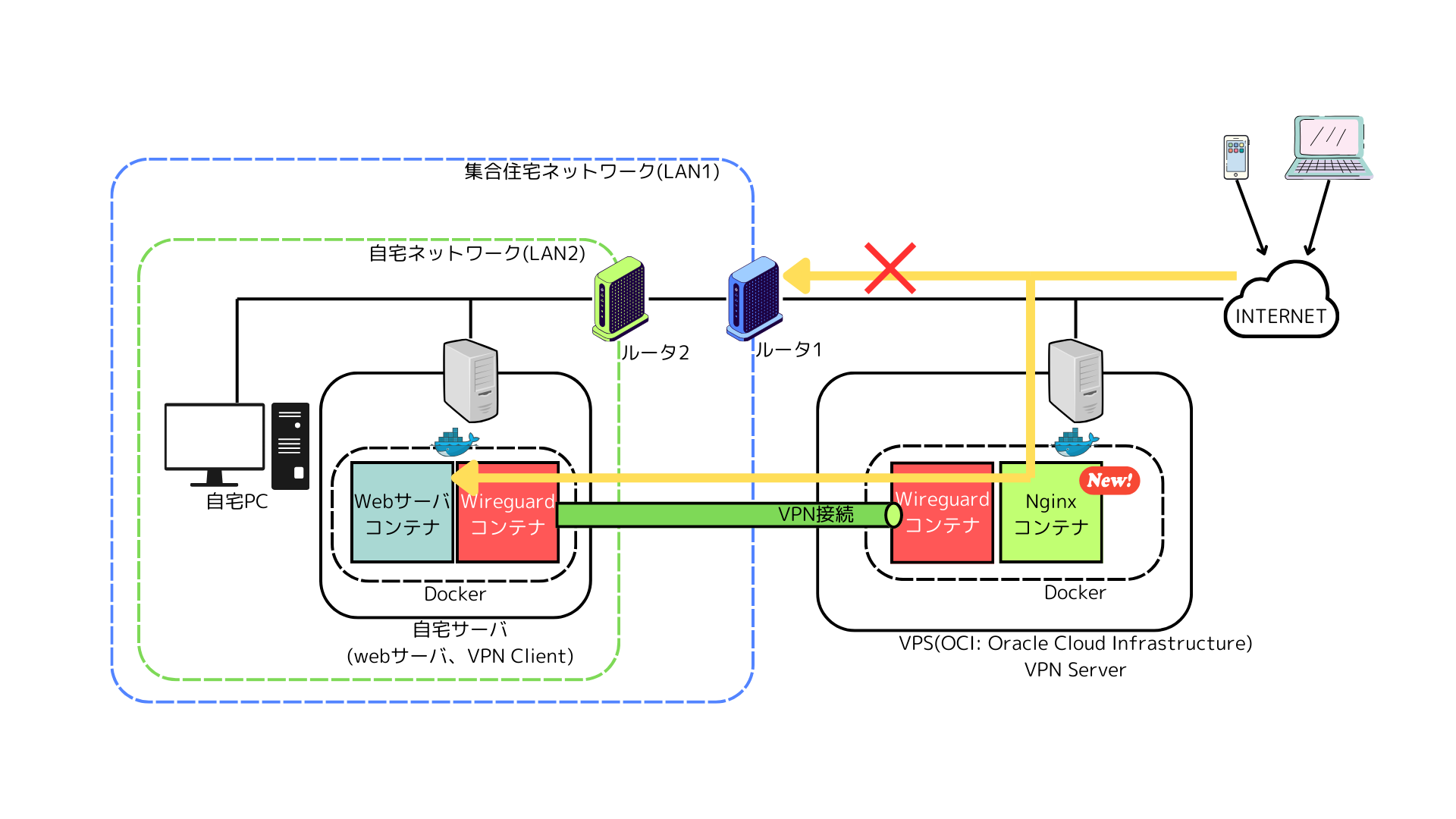
However, the next challenge was “SSL termination." Initially, we tried to handle SSL termination on the OLS side, but we couldn’t route traffic smoothly through Nginx. Ultimately, we decided to handle SSL termination on Nginx. While this solved the communication issue, it created a new side effect: “OLS could no longer automatically renew its certificates using acme tools."
The Backend Server Stripped of SSL Renewal “Authority"
Currently, the SSL certificate for public exposure is managed by Nginx on OCI. However, to maintain consistency for local access within the home network and inter-server communication, the exact same valid certificate must also be deployed on the backend OLS.
Since Nginx occupies port 80, OLS cannot reach out to renew its own certificates. On the other hand, manually copy-pasting certificates every three months goes against the aesthetics of Nando Kobo.
Automating “Doing Nothing": Reducing Manual Annual Updates to “0"
Our target goal is clear.
- Reduce manual time spent on SSL renewals to “0 minutes per year."
- Bypass network constraints (no pushing from OCI to the home network) and synchronize certificates securely.
Rather than giving up with the excuse that “the architecture is too complex, so manual work is inevitable," we will complete the automation while keeping the complex architecture intact.
The Barrier of Permissions and “One-Way" Network Traffic
When automating this, we faced two major challenges.
- Permission Denied: Let’s Encrypt certificates (/etc/letsencrypt/) are protected by root privileges. Regular SSH users cannot read them, and any attempts to use rsync will be rejected.
- Constraint of a Pull-Only Architecture: Even though they are connected via WireGuard, containerized operations and security considerations make it difficult to “push" updates from OCI to the home network. A mechanism where the home side “pulls" the certificates was essential.
Deploy Hook ✕ Pull-Type Synchronization ✕ Graceful Restart
We solved this challenge in three steps.
1. Preparing the “Share" on the OCI Side
We configure a “deploy hook" that leaves the main certificate (owned by root) untouched and creates a copy in a location readable by a regular user only when an update occurs.
# Example Certbot renewal hook configuration on OCI
cp -L /etc/letsencrypt/live/your-domain/fullchain.pem /home/ubuntu/certs/
chown ubuntu:ubuntu /home/ubuntu/certs/*.pem
2. Pull-Type Synchronization Script on the Home Side (copy_ssl_sync.sh)
We specify the private key (id_rsa) and fetch the files using rsync while following symbolic links (-L). Additionally, we incorporated logic to compare file hash values to avoid unnecessary restarts.
#!/bin/bash
# Configuration Area
SSH_KEY="./id_rsa"
SSH_USER="ubuntu"
SSH_HOST="<OCI_IP>"
REMOTE_PATH="/home/ubuntu/certs/"
LOCAL_PATH="/home/root/servers/ols-docker-env/"
OLS_CONTAINER="openlitespeed"

# 1. Hash value comparison
PRE_HASH=$(md5sum ${LOCAL_PATH}fullchain.pem 2>/dev/null | awk '{print $1}')

# 2. Execute synchronization (rsync must also be installed on the remote side)
rsync -avL -e "ssh -i ${SSH_KEY} -o StrictHostKeyChecking=no" \
${SSH_USER}@${SSH_HOST}:${REMOTE_PATH}fullchain.pem ${LOCAL_PATH}
rsync -avL -e "ssh -i ${SSH_KEY} -o StrictHostKeyChecking=no" \
${SSH_USER}@${SSH_HOST}:${REMOTE_PATH}privkey.pem ${LOCAL_PATH}

# 3. Reload OLS only if updates occurred
POST_HASH=$(md5sum ${LOCAL_PATH}fullchain.pem | awk '{print $1}')
if [ "$PRE_HASH" != "$POST_HASH" ]; then
docker exec $OLS_CONTAINER /usr/local/lsws/bin/lswsctrl restart
fi
3. Automating via cron.d with an Emphasis on Reproducibility
Considering ease of management and reproducibility, we placed the configuration file in /etc/cron.d/ rather than using crontab -e.
# /etc/cron.d/ssl-sync
00 03 * * * root cd /home/root/servers/ols-docker-env && /bin/bash copy_ssl_sync.sh >> /var/log/ssl_sync.log 2>&1
[Conclusion] Enjoying Constraints and Taming Systems
By completing this automated SSL renewal setup, we successfully overcame the “constraint" of a complex network architecture using the “wisdom" of scripting.
- The X-Forwarded-For issue was resolved by introducing Nginx.
- The SSL renewal issue was resolved with a pull-type synchronization script.
- Operations and management were resolved through file-based management using cron.d.
At first glance, it might look like a roundabout architecture, but facing each challenge head-on and deriving solutions with one’s own hands is the very embodiment of the rich imagination and inquisitive spirit that “Nando Kobo" holds dear.
Now, we can finally dive back into our next DIY project or technical verification with peace of mind.