Renewing SSL Certificates in an OpenLiteSpeed Container
In this article, we will explain how to renew SSL certificates in an OpenLiteSpeed container environment using ols-docker-env, officially provided by LiteSpeed Technologies.
Previously, we used certbot to renew Let’s Encrypt certificates, but this time we utilized the script included in ols-docker-env. Upon execution, an SSL certificate was issued by ZeroSSL.
April 2025: When I renewed it again after the expiration date arrived, the certificate was issued by Let’s Encrypt.
Environment Preparation
First, clone the ols-docker-env repository to set up the environment. Please refer to the following guide:
Running OpenLiteSpeed + WordPress with Official OpenLiteSpeed Docker
SSL Certificate Renewal Steps
Verification in the WebAdmin Console
Log in to OpenLiteSpeed WebAdmin and check the following settings.
SSL Certificate Path Settings
Go to [WebAdmin] > [Virtual Hosts] > [SSL Tab] and verify that the following values are configured:
- Private Key File:
/root/.acme.sh/certs/$VH_NAME_ecc/$VH_NAME.key - Certificate File:
/root/.acme.sh/certs/$VH_NAME_ecc/fullchain.cer
Checking the Document Root
Select the [General Tab] and check the document root.
- Document Root:
/var/www/vhosts/$VH_NAME/html
Verify that the site/<target virtual host name>/html directory corresponding to this path exists, and create it if it does not.
mkdir -p site/<target virtual host name>/htmlRenewing the SSL Certificate
To renew the SSL certificate, run the following command:
bash bin/acme.sh -D <target virtual host name>Added on 2025/04/30
bin/acme.sh is located in the ols-docker-env directory. For details regarding ols-docker-env, please refer to past articles.
It appears that flags like -r (renew) or -f (force) are not necessary for SSL certificate renewal. Trying to renew too frequently will result in being blocked, so use this when you want to check if a renewal is possible.
※ Note (Added on 2025/05/09)
The acme.sh script requires accessibility to both with-www and without-www domains. Please ensure via DNS settings and OLS server settings that the domain can be accessed with www.
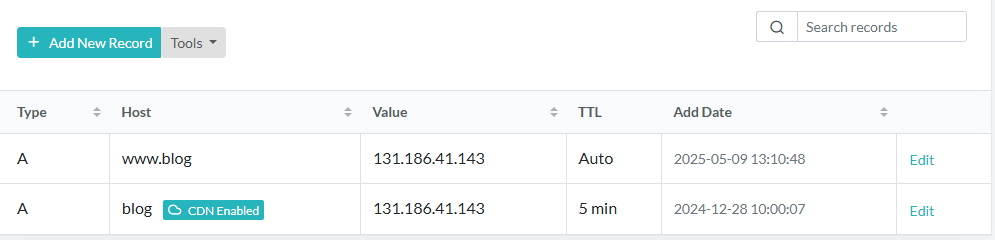
Since I do not prefer the www subdomain, I use OpenLiteSpeed Rewrite Rules to redirect traffic when accessed with www.
- Rewrite Rules
RewriteCond %{HTTP_HOST} ^www\\.blog\\.donguri3\\.net$
RewriteRule ^(.*)$ https://donguri3.net/$1 [R=301,L]
Execution Results
If logs like the following appear, the SSL certificate renewal has been successful.
[Start] Renew ACME
[Fri Feb 14 08:17:40 JST 2025] The domain '<target virtual host name>' seems to already have an ECC cert, let's use it.
[Fri Feb 14 08:17:40 JST 2025] Renewing: '<target virtual host name>'
[Fri Feb 14 08:17:51 JST 2025] Getting webroot for domain='<target virtual host name>'
[Fri Feb 14 08:17:52 JST 2025] Verifying: <target virtual host name>
[Fri Feb 14 08:18:01 JST 2025] Success
[Fri Feb 14 08:18:37 JST 2025] Your cert is in: /root/.acme.sh/certs/<target virtual host name>_ecc/<target virtual host name>.cer
[Fri Feb 14 08:18:37 JST 2025] Your cert key is in: /root/.acme.sh/certs/<target virtual host name>_ecc/<target virtual host name>.key
Conclusion
To renew SSL certificates in an OpenLiteSpeed container environment, configuring the settings properly in the WebAdmin console is crucial. This allows you to maintain secure HTTPS communication.