Using Python in n8n! How to Set Up the Official Task Runner
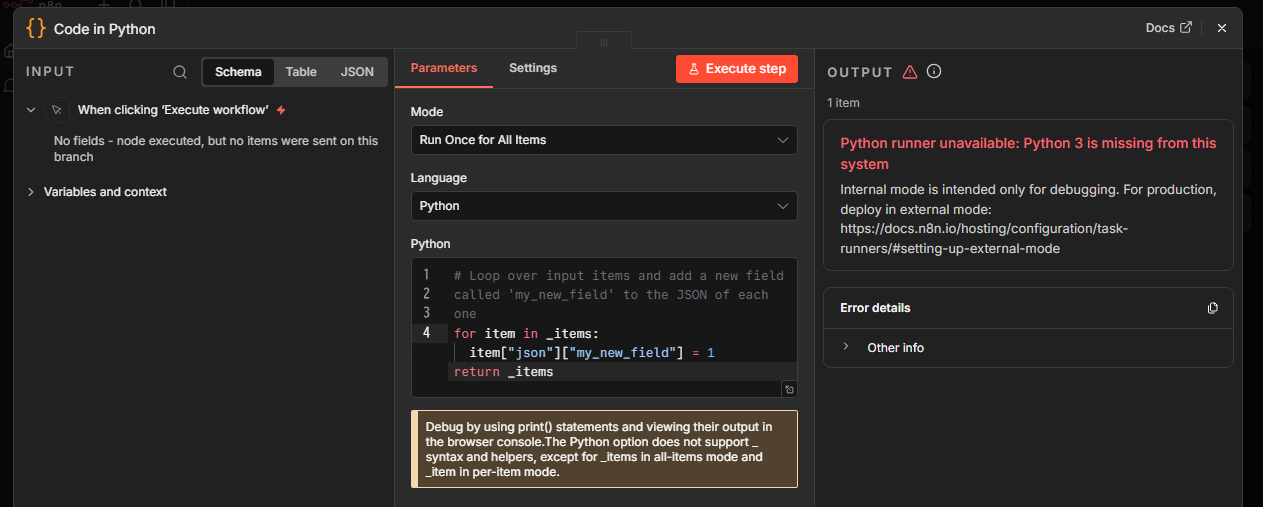
When setting up n8n using a container environment such as Docker, trying to run Python in a “Code node" right out of the box will cause a system error. Specifically, the following message will appear on the screen or in the logs, and processing will be interrupted.
Python runner unavailable: Python 3 is missing from this system
Internal mode is intended only for debugging. For production, deploy in external mode: https://docs.n8n.io/hosting/configuration/task-runners/#setting-up-external-mode
This happens because the standard n8n container image does not include a Python execution environment (runtime).
Strategy for Migrating to the Official Container While Preserving Existing Data
The purpose of this article is to build an environment where Python code can run successfully while completely retaining the configuration and workflow data accumulated so far in an already operational n8n environment. Our goal is to implement “External mode" by linking an external dedicated container, thereby creating a highly maintainable Docker Compose environment that keeps operational efforts consistent even during n8n core version upgrades.
Common Pitfalls: Communication Restrictions and Environment Variable Traps
When migrating to external mode, simply adding the Task Runner container will not work on its own. There are two major reasons for this.
- First, there are security restrictions on the Task Broker built into the core n8n application. By default, it only allows access from the container itself (127.0.0.1), so explicit configuration changes are required to accept connections from external networks.
- Second, specification changes have accompanied recent version updates. Environment variables described in older tutorial articles (such as N8N_RUNNERS_ENABLED) are now deprecated, and using them will prevent proper container-to-container communication. It is essential to use the correct variable names compliant with the latest specifications and configure the communication binding settings properly.
Specific Modifications to docker-compose.yml and Environment Variable Configuration
To migrate the environment while keeping existing data, modify docker-compose.yml as follows. Since the volumes entry where data is stored (./n8n_data) remains untouched, all past configurations and created workflows will be fully inherited.
Before Modification:
services:
  n8n:
    image: n8nio/n8n:latest
    container_name: n8n
    restart: always
    ports:
      - "5678:5678"
    environment:
      - N8N_HOST=localhost
      - N8N_PORT=5678
      - N8N_PROTOCOL=http
      - NODE_ENV=production
      - WEBHOOK_URL=http://localhost:5678/ # Specify domain if exposing externally
      - GENERIC_TIMEZONE=Asia/Tokyo
      - N8N_SECURE_COOKIE=false
    volumes:
      - ./n8n_data:/home/node/.n8n
After Modification:
services:
  n8n:
    image: n8nio/n8n:latest
    container_name: n8n
    restart: always
    ports:
      - "5678:5678"
    environment:
      - N8N_HOST=localhost
      - N8N_PORT=5678
      - N8N_PROTOCOL=http
      - NODE_ENV=production
      - WEBHOOK_URL=http://localhost:5678/
      - GENERIC_TIMEZONE=Asia/Tokyo
      - N8N_SECURE_COOKIE=false
      # [Modification] Specify Task Runner external mode for the latest version
      - N8N_RUNNERS_MODE=external
      # [Modification] Open Broker listening address to all networks (0.0.0.0)
      - N8N_RUNNERS_BROKER_LISTEN_ADDRESS=0.0.0.0
      # Authentication token between core and Runner (set any arbitrary string)
      - N8N_RUNNERS_AUTH_TOKEN=my-secure-runner-token-2026
    volumes:
      - ./n8n_data:/home/node/.n8n

  n8n-runner:
    image: n8nio/runners:latest
    container_name: n8n-runner
    restart: always
    environment:
      # [Modification] Specify core n8n container name and port with the correct environment variable name
      - N8N_RUNNERS_TASK_BROKER_URI=http://n8n:5679
      # Set the same authentication token as the core
      - N8N_RUNNERS_AUTH_TOKEN=my-secure-runner-token-2026
      # Allowed Python standard libraries (comma-separated)
      - N8N_RUNNERS_STDLIB_ALLOW=json,math,datetime
    depends_on:
      - n8n
Restarting Containers and Verifying Code Node Operation
Once configuration file modifications are complete, recreate the containers to apply the settings. Run the following command to remove the old containers and start the new official image and Task Runner in the background.
docker compose down
docker compose up -d
After startup, access the n8n management UI and confirm that your existing workflows remain intact.
Next, place a new “Code" node and change the Language setting to “Python". Select “Run Once for All Items" for the Mode, leave the default code as is, and click “Execute step".
# Loop over input items and add a new field called 'my_new_field' to the JSON of each one
for item in _items:
item["json"]["my_new_field"] = 1
return _items
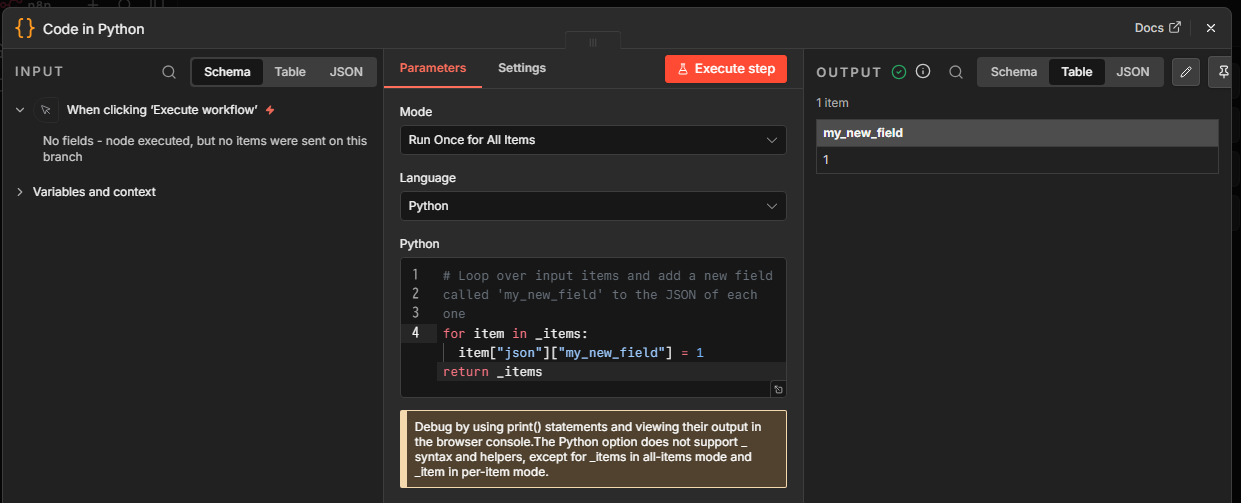
If no errors occur and the JSON result "my_new_field": 1 is returned, integration with the Task Runner is successful. Also, please note that due to security restrictions, when using standard libraries (such as json or math), you must explicitly specify the library names in the N8N_RUNNERS_STDLIB_ALLOW environment variable. Refer to the official documentation for detailed specifications.
Conclusion
We resolved the issue where Python was unavailable in the containerized version of n8n by introducing the official Task Runner container while retaining existing data. By eliminating custom builds and migrating to external mode controlled via environment variables and the built-in Broker, we have improved update compatibility and safety. Verification confirmed that Python execution in Code nodes now functions properly.