Verification: Measuring SD Card SPI Write Speeds on RP2350 (Pico 2 Compatible)
We acquired an RP2350-equipped development board compatible with the Raspberry Pi Pico 2 and conducted write speed verification tests to an SD card to evaluate its hardware SPI performance.
By optimizing settings in a standard 4-wire SPI connection, we achieved a speed of 2.30 MB/s. This article shares detailed verification data, including the impact of allocation unit sizes and buffer sizes on performance.
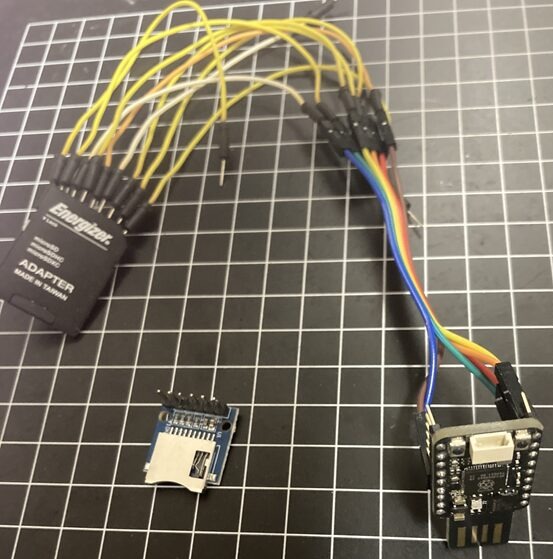
Verification Environment
- Microcontroller: RP2350 (Generic / Raspberry Pi Pico 2)
- Library: SdFat (Arduino)
- Connection Method: Hardware SPI (SPI0)
- MISO: GP0 (RX)
- CS: GP1 (CSn)
- SCK: GP2 (SCK)
- MOSI: GP3 (TX)
- *Implementation: Wires soldered to a spare SD card adapter and connected directly to the RP2350 GPIOs (no bypass capacitors or external pull-up resistors installed).
Verification Results ①: Speed Differences by Allocation Unit Size
First, fixing the SPI clock at 24 MHz, we measured how write speeds varied with different SD card formatting schemes (allocation unit sizes).
The buffer size (amount of data written per operation) was varied from 512 bytes to 64 KB.
[Measurement Results: Write Speed (MB/s)]
(SPI Clock: Fixed at 24 MHz)
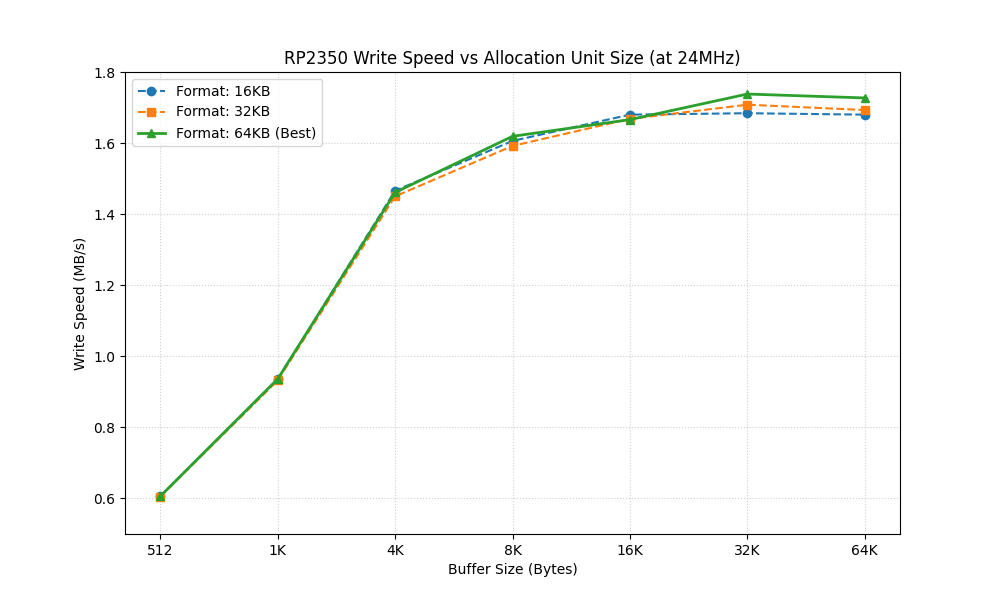
| Buffer Size | 16KB Format | 32KB Format | 64KB Format |
| 512 B | 0.606 | 0.605 | 0.606 |
| 1 KB | 0.935 | 0.932 | 0.936 |
| 4 KB | 1.466 | 1.450 | 1.461 |
| 8 KB | 1.606 | 1.592 | 1.619 |
| 16 KB | 1.680 | 1.668 | 1.666 |
| 32 KB | 1.684 | 1.708 | 1.738 |
| 64 KB | 1.680 | 1.693 | 1.727 |
Analysis:
- Format Impact: Overall, the 64KB format showed the highest performance. Compared to the 16KB format, it showed about a 3.2% improvement in peak speed.
- Buffer Size Impact: Speeds increased as the buffer size grew, but plateaued (saturated) around 32 KB.
Verification Results ②: SPI Clock Frequency and Physical Limits
Next, we fixed the configuration to the best-performing “64KB format" and increased the SPI clock frequency to find the speed limit.
[Measurement Results: Write Speed (MB/s)]
(Format: Fixed at 64KB)
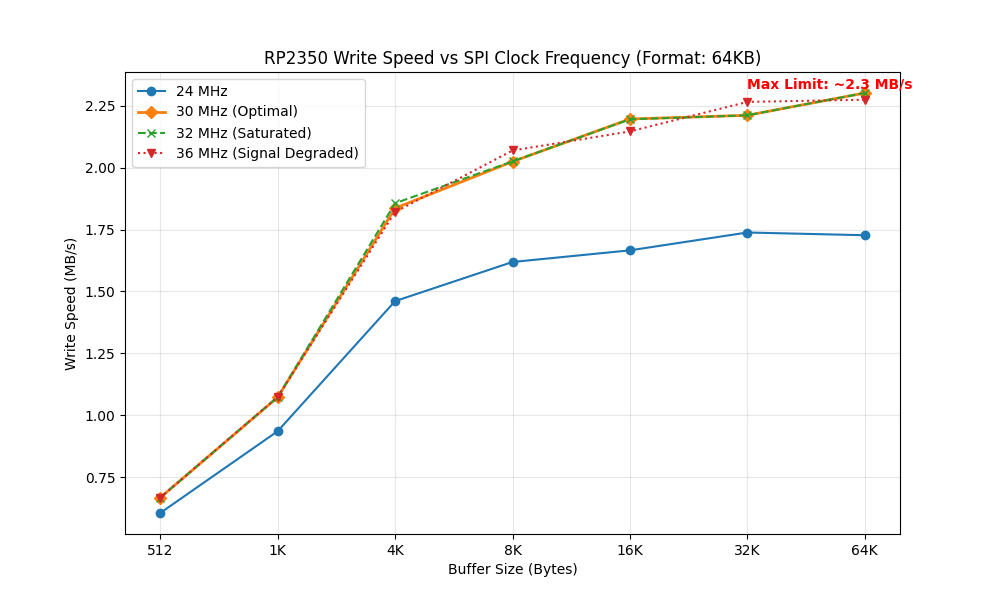
| Buffer Size | 24 MHz | 30 MHz | 32 MHz | 36 MHz |
| 512 B | 0.606 | 0.668 | 0.668 | 0.668 |
| 1 KB | 0.936 | 1.073 | 1.074 | 1.074 |
| 4 KB | 1.461 | 1.836 | 1.856 | 1.821 |
| 8 KB | 1.619 | 2.024 | 2.025 | 2.069 |
| 16 KB | 1.666 | 2.196 | 2.195 | 2.146 |
| 32 KB | 1.738 | 2.211 | 2.211 | 2.265 |
| 64 KB | 1.727 | 2.301 | 2.301 | 2.274 |
At 40 MHz and above, initialization errors occurred and the system failed to operate.
Analysis:
- Fastest Setting: A peak speed of 2.301 MB/s was recorded with a 64KB buffer size at the 30 MHz setting.
- Limiting Factor: Speeds were identical between 30 MHz and 32 MHz. This indicates that the bottleneck is not the RP2350 itself, but rather the internal flash memory write speed of the SD card (Bus Efficiency is approximately 61%).
- Stability: A drop in speed was observed at 36 MHz, suggesting degradation in signal quality. Considering stability, 30 MHz is the optimal choice.
Analysis: Aiming for High-Speed Operation at 40 MHz and Above
In this verification, initialization errors occurred at settings of 40 MHz and above. However, this is likely caused by “electrical signal quality degradation due to wiring" rather than the inherent limits of the RP2350 or SD card controller.
If aiming for even higher speeds (40 MHz to 50 MHz) or greater reliability, the following hardware countermeasures are expected to be effective:
- Addition of Bypass Capacitors
- SD cards draw large peak currents the moment they write (programming flash memory). Placing a 0.1µF to 10µF multi-layer ceramic capacitor between the SD card’s VDD and GND terminals (as close as possible) can prevent instantaneous voltage drops and potentially stabilize high-clock behavior.
- Addition of External Pull-Up Resistors
- The RP2350’s internal pull-up resistors are weak, which can cause signal waveforms to round off (slower rise times) at high speeds of several tens of MHz. Adding external pull-up resistors of around 10kΩ to the signal lines (especially CS, MISO, and MOSI) is expected to clean up the signal waveforms and reduce communication errors.
Although this verification used “minimal wiring," implementing these countermeasures might enable pushing past further limits (such as exceeding 2.5 MB/s).
Conclusion: The Optimal Solution for RP2350 SPI Connection
Based on the verification data obtained, the best practices for SD card SPI communication on the RP2350 are as follows:
- Wiring: Use the RP2350’s hardware SPI pins (such as GP0-3).
- Format: Set the allocation unit size to 64 KB.
- SPI Clock: Set to 30 MHz.
- Buffer: Secure 32 KB or 64 KB for the write buffer.
With the above configuration, even a simple SPI connection can deliver 2.3 MB/s write performance, which is more than sufficient for audio recording and high-speed logging.