Termination of Gemini for VSCode and Context Management
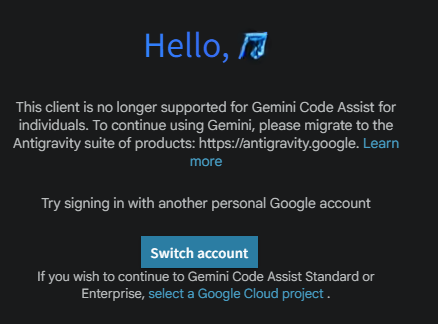
When taking on my first game development challenge, I used the web version of Gemini to organize my ideas while having it write prototype code in Python. Once a certain level of operation was confirmed, I introduced the “Gemini Code Assist" extension for VS Code to transition to more serious development. Just as I was impressed by its ease of use in the editor and was about to dive into serious game development, support for the free tier of “Gemini Code Assist" for individuals was discontinued on June 18, 2026. I adopted it completely unaware that it was right at the end of its service life, and faced the highly comical situation of having the shutters pulled down right after realizing its convenience. The following error message suddenly appeared on the screen, and traditional AI assistance on VS Code completely stopped.
Hello, XXX
This client is no longer supported for Gemini Code Assist for individuals. To continue using Gemini, please migrate to the Antigravity suite of products: https://antigravity.google. Learn more
Try signing in with another personal Google account
If you wish to continue to Gemini Code Assist Standard or Enterprise, select a Google Cloud project .
This error message prompted a migration to Google’s proprietary editor, “Antigravity IDE."
The Danger of Relying on a Single AI Tool
This incident clearly highlighted the danger of relying too heavily on AI tools provided by a specific vendor. It became apparent that changes in specifications, tool lifespans, or policy updates could lead to the loss of past development context.
To solve this issue, while migrating to the newly specified “Antigravity + Gemini Pro" environment, I recommend “Markdown-based context management" as a useful tip to ensure smooth transitions no matter what AI tools are used in the future.
Migration to the New Environment and Discrepancy Detection
My goal was to create a state where game development could continue seamlessly as before, even when moving the development environment to an unfamiliar editor. I tested whether the new AI (Antigravity + Gemini Pro) could accurately point out discrepancies (contradictions) between the code and specifications and complete the self-repair of the documentation when fed both the “latest source code" and the “old Markdown lacking the final specification changes" simultaneously.
Imprisoned Dialogue Logs and Outdated Documentation
The biggest barrier was the fact that past chat history could no longer be referenced at all. Even by analyzing hidden local storage folders using Sqlite3, the raw dialogue data could not be recovered, and no log export feature was provided. This brought to light the reality that relying on the internal storage of an AI tool for context results in losing that context during a forced migration.
Smooth Migration via DEVELOPMENT_CONTEXT.md
As a solution that does not rely on internal chat history, I applied “context management using Markdown files." Actually, this structure is a repurposing of an idea proposed by Gemini itself: when I was struggling with my first game development, I brainstormed ideas with the web version of Gemini and then asked Gemini how to smoothly carry over the complex development context when transitioning to the VS Code version.
By placing `DEVELOPMENT_CONTEXT.md` at the project root, the game’s objectives, rules, and requirements definition are managed locally. After migrating to Antigravity IDE, I used the `@workspace` command in the chat input field and gave the following instruction:
@workspace #DEVELOPMENT_CONTEXT.md Please read the current complete set of source code and this development context file, and check for any missing inconsistencies.
Accurately Detecting and Repairing Code-Specification Discrepancies
The AI in Antigravity IDE compared the latest source code with the contents of `DEVELOPMENT_CONTEXT.md`, which was outdated because the final spec changes hadn’t been reflected yet, and brilliantly detected the parts where code changes were missing from the Markdown (the discrepancies). Furthermore, it even proposed modifying and updating the Markdown itself to match the current state of the code.
The baton of context built alongside the AI functioned as the key to environment recovery during the unexpected event of a forced migration. Not only did it make me resilient against AI-side specification changes, but it also simultaneously achieved migration testing of the development environment and automated documentation maintenance. This served as proof of how powerful and practical a tip it is to self-manage prompts and context in Markdown when utilizing AI.
Conclusion
Shortly after transitioning from the web version to the VS Code version in my first game development and experiencing its convenience, support for Gemini ended, forcing a migration to Antigravity. This made me painfully aware of the danger of depending on a single AI tool and losing context. The self-management approach using `DEVELOPMENT_CONTEXT.md` previously suggested by Gemini proved effective, and feeding this file into the new environment enabled a smooth migration. I was able to accurately detect and repair discrepancies between the code and specifications, truly realizing the importance of context management.