Document Analysis with Open WebUI and MarkItDown
In recent times, building local LLM environments using Ollama and Podman has become extremely easy. However, when having AI read rich documents such as PDFs and Excel files, high hurdles still remain. While many LLMs excel at handling text data, there is a limit to their accuracy when directly interpreting binary-format files.
As a means to solve this problem, Microsoft’s “MarkItDown" has been gaining attention. This is a tool that converts PDFs and Office files into Markdown format, which is easiest for AI to understand. By seamlessly integrating this with Open WebUI—a chat interface—we aimed to build an environment where local materials can be analyzed instantly.
Full Automation of the Conversion Process and Pursuit of Accuracy
The objective of this build is to complete a pipeline where simply drag-and-dropping a PDF into the Open WebUI chat screen executes high-precision Markdown conversion via MarkItDown, allowing the LLM to instantly summarize and analyze the contents.
We set the following two quantitative goals:
- Reduction of manual operations: Eliminate text extraction and copy-and-paste tasks using external tools by 100%, aiming for completion entirely within the chat UI.
- Improvement of analysis accuracy: Compared to text extraction using Open WebUI’s built-in standard parser, routing through MarkItDown—which excels in retaining charts, tables, and structured data—significantly boosts reading comprehension accuracy for complex data sheets and similar files.
The Barriers of “UUID Renaming" and “Caching" That Hinder Development
As implementation progressed, we faced two technical challenges unique to containerized environments.
- The “loss of file storage path and name." When a file is dropped into the Open WebUI chat screen, it is saved on the server (inside the container) with a filename assigned a random UUID (e.g., da99462c…_datasheet.pdf). Because the LLM cannot recognize this random string, it cannot pass the correct file path to MarkItDown, causing analysis errors.
- Podman’s “missing dependencies due to build cache." Analyzing PDFs with MarkItDown requires installing an extension library called markitdown[all]. However, even when modifying requirements.txt afterward, the caching function kicked in, resulting in a phenomenon where the heavy PDF analysis package was actually not installed.
Build Method: Breakthrough via Addition of MCPO Container and Wildcard Search
To address these challenges, we sought solutions from both the infrastructure configuration and Python script perspectives.
File Structure
Working Directory/
 ├── docker-compose.yml
 ├── webui-data/             # *Automatically generated (Open WebUI data storage destination)
 └── mcpo-markitdown/        # Folder containing the following three files
      ├── requirements.txt
      ├── Dockerfile
      └── server.py
Sharing Volume Mounts and Forced Rebuild
To ensure that the directory where Open WebUI saves files and the directory read by the MCPO container are identical, we added the following configuration to docker-compose.yml. Furthermore, to overcome the caching barrier, we forcefully rebuilt the container using podman-compose build –no-cache, reliably installing the PDF analysis library.
services:
  ollama:
    image: docker.io/ollama/ollama:0.20.6
    container_name: ollama
    ports:
      - "11434:11434"
    environment:
      - "OLLAMA_KEEP_ALIVE=-1"  # Keep in VRAM with -1
      - "OLLAMA_MAX_LOADED_MODELS=2"    # Allow loading 2 models simultaneously
    volumes:
      - ollama_data:/root/.ollama
    devices:
      - nvidia.com/gpu=all
  open-webui:
    image: ghcr.io/open-webui/open-webui:main
    container_name: open-webui
    ports:
      - "3000:8080"
    volumes:
      # Mount host-side ./webui-data to container's /app/backend/data
      - ./webui-data:/app/backend/data
    restart: always

  mcpo-markitdown:
    build: ./mcpo-markitdown
    container_name: mcpo-markitdown
    ports:
      - "8000:8000"
    volumes:
      # Mount the exact same host directory as Open WebUI as "read-only (ro)"
      - ./webui-data:/app/backend/data:ro
    restart: always
Python Dependency Packages
These are the Python dependency packages.
mcpo
markitdown[all]
mcp
Dockerfile
This Dockerfile avoids the trap of the build cache and ensures the heavy libraries for PDF analysis are installed.
FROM python:3.12-slim

WORKDIR /app

# First, copy requirement files and perform basic installation
COPY requirements.txt .
RUN pip install --no-cache-dir -r requirements.txt

# A reassuring extra step to ensure the [all] option (PDF and Office parsing engines) is installed
RUN pip install --no-cache-dir "markitdown[all]"

# Copy script group
COPY . .

# Convert standard I/O to Web API (OpenAPI) via mcpo and start up
CMD ["mcpo", "--host", "0.0.0.0", "--port", "8000", "--", "python", "server.py"]
Path Auto-Identification Script Using Wildcard Search
To solve the UUID issue, we modified the script (server.py) running on the MCPO side. We implemented a mechanism where the LLM is only made to pass the “original filename," and Python’s glob module is used to perform a wildcard search within the upload directory.
import os
import glob
from mcp.server.fastmcp import FastMCP
from markitdown import MarkItDown

# Initialize MCP Server and MarkItDown
mcp = FastMCP("MarkItDown Converter")
md = MarkItDown()

@mcp.tool()
def convert_to_markdown(filename: str) -> str:
"""
Converts the file uploaded to the chat into Markdown.
Args:
filename: The name of the uploaded file, or a part of it (e.g., datasheet.pdf)
"""
# Upload destination path of the shared mount directory in docker-compose
upload_dir = "/app/backend/data/uploads"

# Perform a wildcard search among files assigned with UUIDs for one containing the filename
search_pattern = os.path.join(upload_dir, f"*{filename}*")
matched_files = glob.glob(search_pattern)

if not matched_files:
return f"Error: No file containing '{filename}' was found in the upload folder."

# If multiple files with the same name exist, target the most recently uploaded one
target_file = max(matched_files, key=os.path.getmtime)

try:
# Execute conversion with MarkItDown using the discovered full path
result = md.convert(target_file)
return result.text_content

except Exception as e:
return f"Error: An issue occurred during conversion: {str(e)}"

if __name__ == "__main__":
# Since mcpo wraps and communicates, it internally starts via stdio
mcp.run()
This allows users to simply instruct, “Please read this datasheet.pdf," enabling the system to automatically identify the full path with the UUID and execute the analysis.
Startup and Integration Procedure (Grand Finale)
Once the file placement is complete, run the following commands to perform a clean build without using the cache and start up the services. (*Run podman-compose or docker-compose according to your environment)
podman-compose down
podman-compose build --no-cache
podman-compose up -d
Execution Results
We loaded the ESP32-WROOM-32E Datasheet and verified whether it could be analyzed successfully.
The chat response’s sources include the uploaded file and a source named tool_convert_to_markdown_post, where the latter is the Markdown converted by MarkItDown.
An example of extracting information from the cover page is shown below:
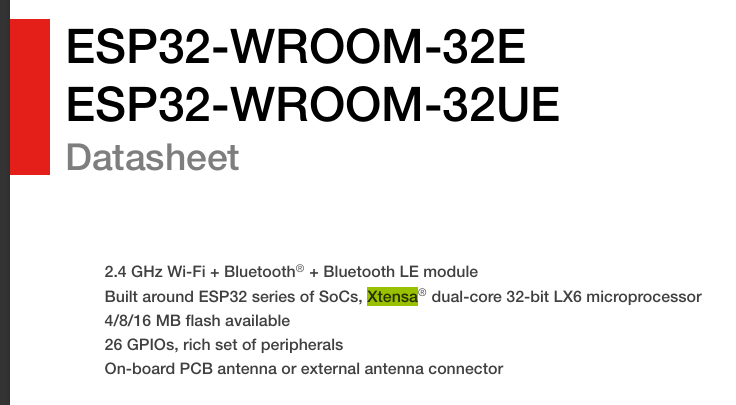
ESP32WROOM32E ESP32WROOM32UE Datasheet 2.4 GHz WiFi + Bluetooth® + Bluetooth LE module Xtensa® Built around ESP32 series of SoCs, dualcore 32bit LX6 microprocessor 4/8/16 MB flash available --------- ------------------ -------------- ----------------- 26 GPIOs, rich set of peripherals Onboard PCB antenna or external antenna connector
Evolution Into a Practical Personal AI Assistant
Through this setup, an environment has been established where simply dropping complex English datasheets like the ESP32 into the chat allows local models like Qwen3 or Gemma3 to accurately summarize the contents based on the structured data parsed by MarkItDown.
The integration of Open WebUI and MCP tools transforms a simple chatbot into an agent that autonomously utilizes tools. The “file search method that hides UUIDs from the user" established this time is applicable not only to MarkItDown but to any MCP server handling local files. Even without a vast space, I am convinced that accumulating such techniques is the key to unlocking infinite possibilities from a limited space like a storeroom (Nando).