Full Synchronization of Times Car Reservations to Your Own Calendar! Building a “Forgot-to-Cancel Prevention” Feature with n8n
The other day, I had a bitter experience where I forgot to cancel a Times Car reservation and ended up being charged several thousand yen in usage fees despite never even driving the car. The cause was simple human error: I completely forgot to put the reservation itself into my calendar, and it was entirely erased from my brain.
“I will never repeat this wasteful expense again."
With that resolve, I decided to build a system that reflects reservation status in my smartphone calendar in real-time. While this kind of automation is possible using iPhone “Shortcuts" or automation features, I deliberately chose to solve it server-side using n8n.
Why the Choice of “n8n"?
There is a solid, practical reason for “not keeping everything confined to a smartphone."
- No device constraints: Even if the smartphone’s battery dies or it’s out of service range, the server monitors emails 24/7 and completes the processing.
- Affinity with existing infrastructure (DAViCal): I wanted to stream data directly into the calendar server (DAViCal) that I already operate at home.
- Advanced conditional branching: It’s not just simple “registration." n8n’s flexible logic was indispensable for parsing complex email formats—determining actual usage times from “reservation changes," “cancellations," and “return receipts," and even handling “rental unavailibility notifications due to vehicle trouble" to rewrite the calendar accordingly.
Setting Up the n8n Environment (docker-compose.yml)
First, we launch n8n using Docker. As explained in Part 1, set N8N_HOST to localhost only during OAuth authentication, and revert it back to the server’s static IP after authentication is complete.
services:
n8n:
image: n8nio/n8n:latest
container_name: n8n
restart: always
ports:
- "5678:5678"
environment:
- N8N_HOST=localhost # Change to static IP after authentication
- N8N_PORT=5678
- N8N_PROTOCOL=http
- NODE_ENV=production
- GENERIC_TIMEZONE=Asia/Tokyo
- WEBHOOK_URL=http://localhost:5678/ # Change to static IP after authentication
- N8N_SECURE_COOKIE=false;
volumes:
- ./n8n_data:/home/node/.n8n
Initial Setup of n8n
Once the container starts, access http://<n8n-server>:5678 in your browser. An account creation screen will appear first, but for personal use, proceed with the following steps.
- Account Creation: Set your email address and password.
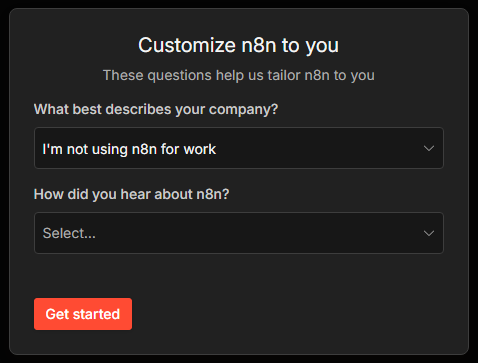
- Survey Screen: A question appears: “What best describes your company?" (What best describes your organization?)
- Here, just select “I’m not using n8n for work".

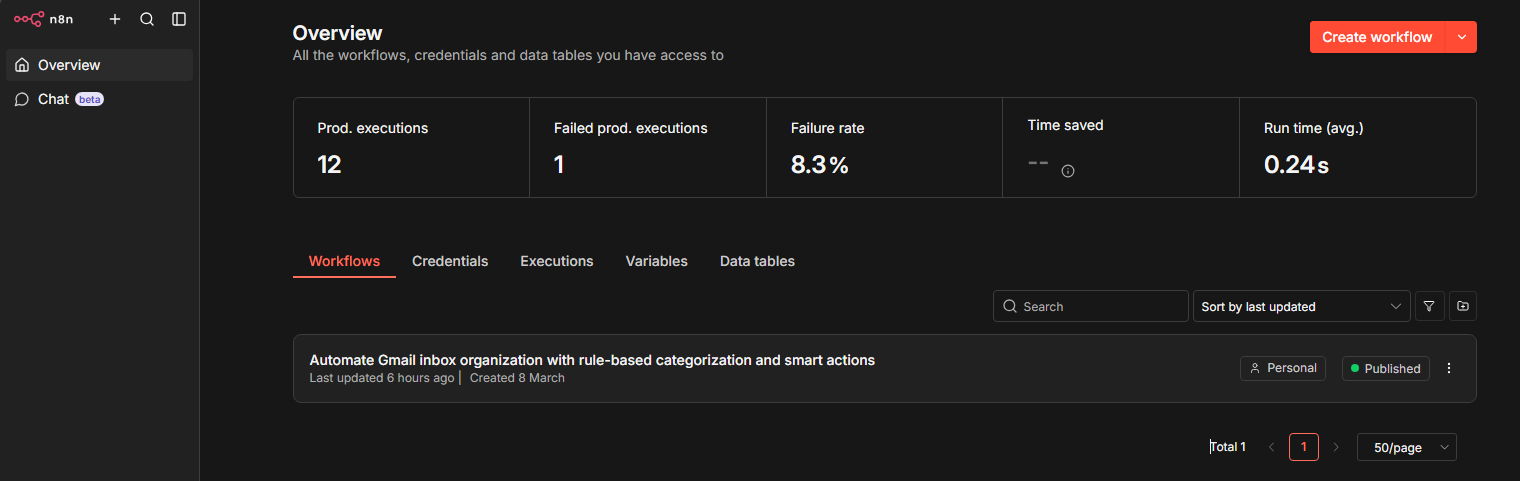
- Start: Clicking the “Get started" button will display the main screen (canvas).
- Begin Creation: Click “Create Workflow" and start drawing your very own automation pipeline!
Workflow Design Philosophy
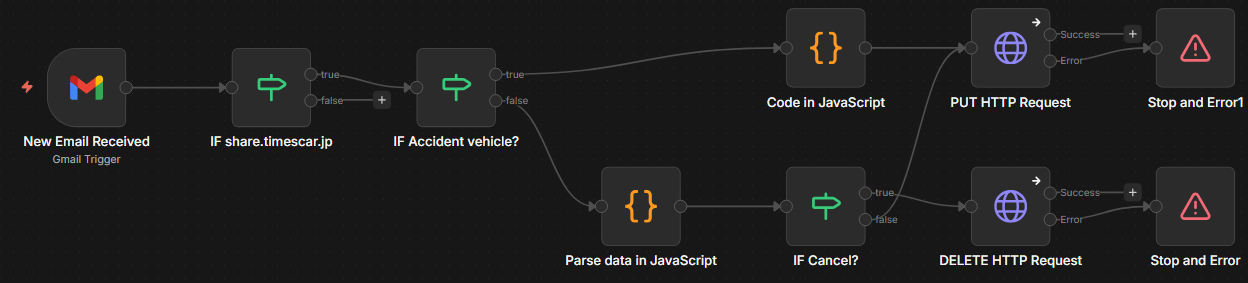
The parsing scripts are separated into “Standard Use" and “Accident/Trouble Use" depending on the email subject (because the formats for reservation numbers and other details differ).
- Gmail API: Check for new emails every 1 minute.
- Switch Node: Branch based on the title.
- “There is a possibility that the reserved vehicle cannot be used" → Accident route
- Everything else (registration, modification, cancellation, return) → Standard route
- JavaScript Node: Extract date/time and reservation numbers according to each format.
- HTTP Request: Execute PUT (create/update) or DELETE (delete) to DAViCal.
Parsing Processing Using JavaScript
This is the core heart of generating the calendar format (.ics) from the email body.
[For Standard Route] Managing Reservations, Modifications, Cancellations, and Returns
const items = $input.all();

return items.map(item => {
// Retrieve text or textPlain depending on Gmail output
const body = item.json.text || item.json.textPlain || "";
const subject = item.json.subject || "";

// 1. Common: Extract reservation number
const resIdMatch = body.match(/■予約番号
(\d+)/);
const resId = resIdMatch ? resIdMatch[1] : "000000";

// 2. Determine action
let action = "PUT";
if (subject.includes("予約取消完了")) {
action = "DELETE";
}

// 3. Extract data (only for PUT)
let startTime = "", endTime = "", stationName = "タイムズカー", stationUrl = "", carModel = "";

if (action === "PUT") {
// Extract vehicle
const carMatch = body.match(/■車両
([^
]+)/);
carModel = carMatch ? carMatch[1].trim() : "";

// Separate station name and URL
const stationMatch = body.match(/■ステーション
([^
]+)
(https?:\/\/[^
]+)/);
if (stationMatch) {
stationName = stationMatch[1].trim();
stationUrl = stationMatch[2].trim();
}

// [Fix Point 1] Date/time parsing helper (modified to insert T)
const formatIcsDate = (str) => {
if (!str) return "";
const clean = str.replace(/[\/ :]/g, ''); // 202603141000
return clean.slice(0, 8) + 'T' + clean.slice(8, 12) + '00'; // 20260314T100000
};

if (subject.includes("返却証")) {
const timeMatch = body.match(/■利用時間
(\d{4}\/\d{2}\/\d{2} \d{2}:\d{2}) - (\d{4}\/\d{2}\/\d{2} \d{2}:\d{2})/);
if (timeMatch) {
startTime = formatIcsDate(timeMatch[1]);
endTime = formatIcsDate(timeMatch[2]);
}
} else {
const startMatch = body.match(/■利用開始日時
(\d{4}\/\d{2}\/\d{2} \d{2}:\d{2})/);
const endMatch = body.match(/■返却予定日時
(\d{4}\/\d{2}\/\d{2} \d{2}:\d{2})/);
startTime = startMatch ? formatIcsDate(startMatch[1]) : "";
endTime = endMatch ? formatIcsDate(endMatch[1]) : "";
}
}

// 4. Build iCalendar data
const summaryPrefix = subject.includes("返却証") ? "【返却済】" : "【予約】";
const summary = `Times:${summaryPrefix}${stationName}`;
const icsDataRaw = `BEGIN:VCALENDAR
VERSION:2.0
PRODID:-//Nando Kobo//n8n//EN
BEGIN:VEVENT
UID:times-${resId}
SUMMARY:${summary}
DTSTART:${startTime}
DTEND:${endTime}
LOCATION:${stationName}
DESCRIPTION:車両: ${carModel}\
ステーション: ${stationName}
URL:${stationUrl}
END:VEVENT
END:VCALENDAR`;

// [Fix Point 2] Batch replace line break codes from
 to \r
 (CRLF)
const icsData = icsDataRaw.replace(/
/g, '\r
');

return {
json: {
action,
resId,
fileName: `times-${resId}.ics`,
icsData,
isCancel: action === "DELETE"
}
};
});
[For Accident/Trouble Route] Visualizing Emergencies
const items = $input.all();

return items.map(item => {
const body = item.json.text || item.json.textPlain || "";

// 1. Extract reservation number
const resIdMatch = body.match(/【予約番号】(\d+)/);
const resId = resIdMatch ? resIdMatch[1] : "000000";

// 2. Station and vehicle
const stationMatch = body.match(/【ステーション】([^
]+)/);
const stationName = stationMatch ? stationMatch[1].trim() : "タイムズカー";

const carMatch = body.match(/【車両】([^
]+)/);
const carModel = carMatch ? carMatch[1].trim() : "不明";

// 3. Special date/time parsing (2026/03/20 08:00 ~ 2026/03/21 22:00)
const formatIcsDate = (str) => {
const clean = str.replace(/[\/ :]/g, '');
return clean.slice(0, 8) + 'T' + clean.slice(8, 12) + '00';
};

const timeMatch = body.match(/【予約日時】(\d{4}\/\d{2}\/\d{2} \d{2}:\d{2}) ~ (\d{4}\/\d{2}\/\d{2} \d{2}:\d{2})/);
const startTime = timeMatch ? formatIcsDate(timeMatch[1]) : "";
const endTime = timeMatch ? formatIcsDate(timeMatch[2]) : "";

// 4. Build iCalendar data
const summary = `【事故!!】${stationName}`;
const stationUrl = "https://share.timescar.jp/view/sp/reserve/list.jsp";
const description = `※車両トラブル発生中!別車両への変更が必要です。\
車両: ${carModel}\
予約番号: ${resId}`;

const icsData = `BEGIN:VCALENDAR
VERSION:2.0
PRODID:-//Nando Kobo//n8n//EN
BEGIN:VEVENT
UID:times-${resId}
SUMMARY:${summary}
DTSTART:${startTime}
DTEND:${endTime}
LOCATION:${stationName}
DESCRIPTION:${description}
URL:${stationUrl}
END:VEVENT
END:VCALENDAR`.replace(/
/g, '\r
');

return {
json: {
action: "PUT",
resId,
fileName: `times-${resId}.ics`,
icsData,
isCancel: false
}
};
});
Countermeasures Against the “Fastidiousness" of the iCalendar Specification
Here is the prescription for two technical traps faced during writing to DAViCal:
- The date/time “T": Strictly adhere to the 20260314T100000 format (requiring a T in the middle).
- Line break codes: Convert all line breaks to CRLF using .replace(/
/g, '\r
’). Missing this will result in an error (500) during DAViCal database registration.
Conclusion: If There Is No API, Just Build One
Times Car does not have an official API, but by parsing incoming emails, they can be transformed into a proper API.
Through this build, my calendar has become a living log where “reservations, accidents, and returns" are automatically synchronized. Building a system exclusively for yourself in your own workshop—this is the true essence of self-hosting.