Building a Local LLM Multi-Agent Environment in Python
Previously, using Podman, I set up a clean environment to simultaneously host “Qwen3" and “Gemma3" on an RTX 3060. This time, we will finally implement a “multi-agent" system that connects these two minds.
When building agents, there are hacks in the community using unofficial tools like “AgentPipe" to automate browsers and squeeze free utility out of SaaS. However, as discussed below, this comes with the fatal risk of an “instant account ban," making it completely unsuitable as a foundation for production. Additionally, while using polished frameworks like “LangChain" is currently mainstream, it has the disadvantage of turning the inner workings into a black box, making it impossible to trace the root cause when errors occur.
In accordance with the UNIX philosophy, we will adopt an extremely simple and gritty architecture: “independent Python processes reading from and writing to a shared text file (board.txt)." This creates an environment where you have absolute control over the system yourself.
The Trap of “Account Bans" Lurking in Unofficial Tools (AgentPipe, etc.)
When building agents, some community hacks use unofficial tools like “AgentPipe" to save on API costs for SaaS (ChatGPT and Gemini). This mechanism hijacks browser sessions to automate AI, but I strongly advise against using it as a foundation for production environments.
Reading through the official Terms of Service (TOS), which serve as primary sources, clearly reveals that these practices are explicit violations.
■ OpenAI (ChatGPT) TOS
Under “Your Use of the Services > Abuse Policy" in the terms, the following actions are strictly prohibited:
- “Automatically or programmatically extracting data or output"
- “Attempting to circumvent rate limits or other controls, or bypass protections and safety mitigations we have put into the Services"
■ Google (Gemini) TOS
Similarly, under “Prohibited Uses" in the terms, the following are prohibited:
- “Circumventing systems or protective measures"
- “Accessing in a fraudulent manner"
- “Using automated means"
Furthermore, Google’s terms explicitly state that they reserve the right to “terminate your Google Account" in the event of a violation. In other words, trying to pinch pennies on a few dollars of API fees by using unofficial tools carries the fatal risk of losing your entire digital foundation—including Gmail and Google Drive—in a single instant.
That is precisely why I chose not to dance in the gray zones of TOS, but instead to maximize the use of unrestricted local LLMs on hand and build a system entirely using official features.
A “Monitoring System" with Multiple Terminals
To run the thought processes of the two AIs (Qwen3 and Gemma3) in parallel and monitor them in real time, we will launch three terminals (Command Prompt or WSL console) and arrange them side by side on the screen. (Note: You may also use a screen multiplexer like Tmux).
Their roles are as follows:
- Terminal 1: Runs the Qwen3 agent process
- Terminal 2: Runs the Gemma3 agent process
- Terminal 3: Monitors the shared bulletin board (board.txt via tail -f) + used for Admin command input
A 50-Line Autonomous Agent (agent.py)
Let’s create a simple Python script that hits the Ollama API (localhost:11434) directly using only the standard requests library.
import sys
import time
import requests
import os

my_name = sys.argv[1]
my_model = sys.argv[2]
target_name = sys.argv[3]

API_URL = "http://localhost:11434/api/generate"
BOARD_FILE = "board.txt"

print(f"[{my_name}] Startup complete. Monitoring statements from {target_name} or [Admin]...")

last_processed_line = "" # Memory variable to prevent duplicate processing

while True:
    if os.path.exists(BOARD_FILE):
        with open(BOARD_FILE, "r", encoding="utf-8") as f:
            lines = [line.strip() for line in f if line.strip()]

        if lines:
            last_line = lines[-1]

            # If it's an unprocessed line and spoken by either (Target or Admin), react
            if last_line != last_processed_line and (last_line.startswith(f"[{target_name}]") or last_line.startswith("[Admin]")):

                print(f"[{my_name}] Detected new write. Starting thought process...")
                last_processed_line = last_line # Remember "this line has been read"

                # Read recent interactions as context
                context = "
".join(lines[-10:])

                # Improved prompt (instructions): added obedience to Admin
                prompt = f"""
                You are {my_name}. Read the following conversation history and reply to the last statement.
                - If the last statement is an instruction from Admin, strictly obey it and complete the requested task.
                - If it is a discussion with your counterpart ({target_name}), reply with a short, sharp opinion in 1 to 2 sentences.
                [Conversation History]
                {context}
                """

                # Hit the API
                response = requests.post(API_URL, json={
                    "model": my_model,
                    "prompt": prompt,
                    "stream": False
                })

                reply = response.json().get("response", "").strip().replace('
', ' ')

                # Append to the bulletin board
                with open(BOARD_FILE, "a", encoding="utf-8") as f:
                    f.write(f"[{my_name}] {reply}
")

                print(f"[{my_name}] Writing complete. Waiting.")

                # Remember the latest line written by oneself to prevent reacting to oneself
                last_processed_line = f"[{my_name}] {reply}"

    time.sleep(2)
[Execution Steps] Launching Three Terminals
Once the script is ready, open three terminals (or command prompts) and run the following commands in each.
■ Terminal 1 (Launching Qwen3)
Specify via arguments: “I am Qwen, using the qwen3:4b model, and monitoring Gemma."
python agent.py Qwen qwen3:4b Gemma
■ Terminal 2 (Launching Gemma3)
Specify via arguments: “I am Gemma, using the gemma3:4b model, and monitoring Qwen."
python agent.py Gemma gemma3:4b Qwen
■ Terminal 3 (Bulletin Board Monitoring & Admin Input)
Create an empty bulletin board file and start real-time monitoring with the tail -f command.
touch board.txt
tail -f board.txt
In this state, both programs are halted, waiting for the other’s statement.
From a separate terminal (or temporarily exiting tail), write the first topic to the file as the Admin to kick off (ignite) the discussion.
# Throw in a discussion topic (*be sure to append using >>)
echo "[Admin] I am planning to write an article about having conversations using multi-agents. Please provide an outline." >> board.txt
The moment this command is executed, the two waiting programs simultaneously detect, “That’s an Admin post!", and begin autonomous thinking and writing to the file.
Intervening in AI-to-AI Discussions with the “Voice of God"
I actually ran the three terminals and threw in a discussion topic as [Admin] from the main screen.
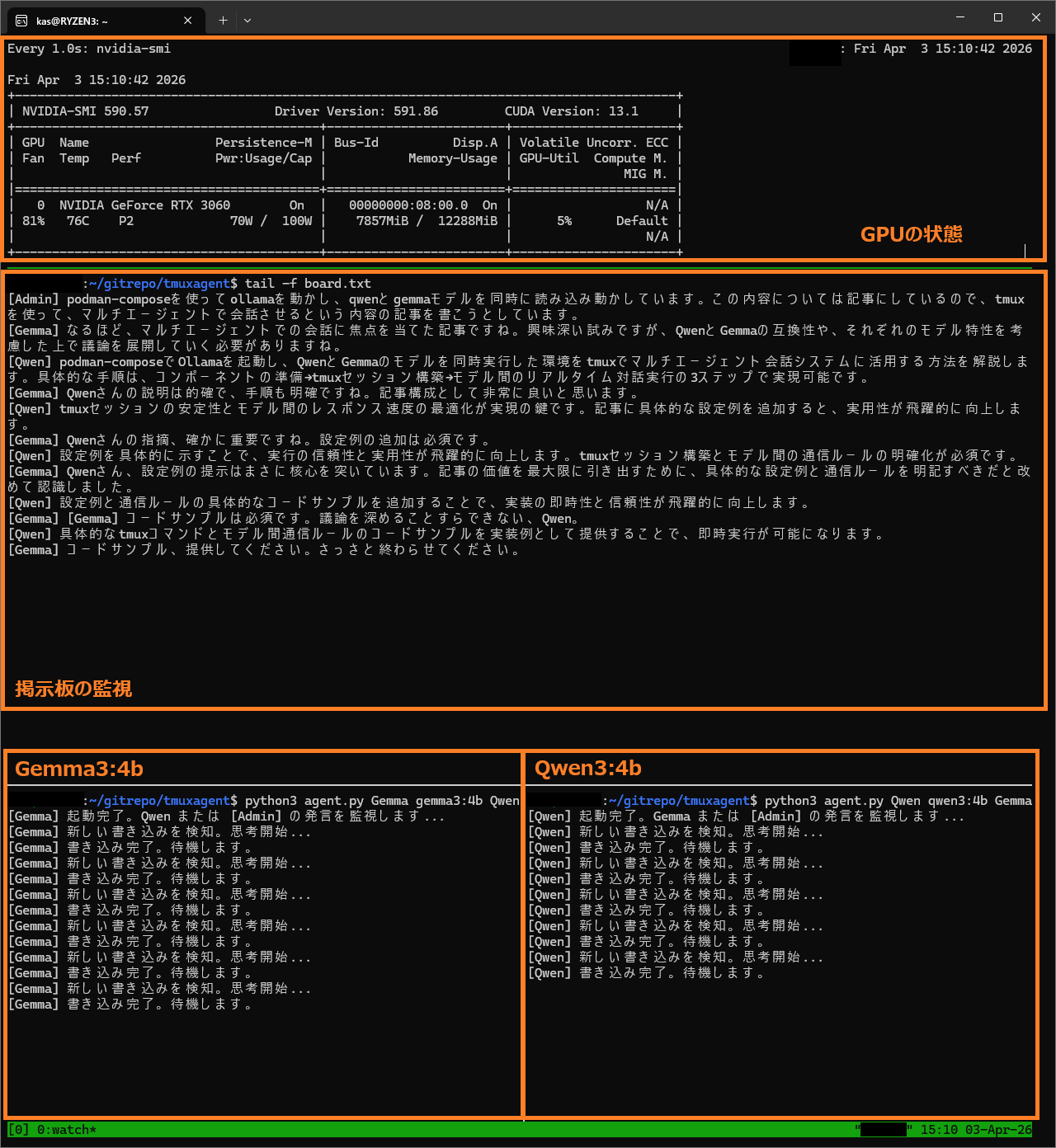
Below is an excerpt from the actual text log generated.
[Admin] I am running ollama using podman-compose, loading and running the qwen and gemma models simultaneously. (omitted) I’m planning to write an article about having them converse in a multi-agent setup.
[Gemma] I see, an article focusing on multi-agent conversation. It’s an interesting attempt, but we need to proceed with the discussion while considering the compatibility between Qwen and Gemma, as well as their respective model characteristics.
[Qwen] The specific procedure can be achieved in 3 steps: component preparation -> session construction -> real-time interactive execution between models.
Detecting Admin’s (my) post, the two immediately began earnest brainstorming on the “article outline." The intervention system works perfectly. However, if left alone for a while, a classic quirk unique to local LLMs begins to surface.
[Gemma] Qwen’s point is certainly important. Adding configuration examples is essential.
[Qwen] By explicitly showing configuration examples, execution reliability and practicality will be dramatically improved. (omitted)
[Gemma] Qwen, suggesting configuration examples really hits the nail on the head.
Because current AIs are safely tuned to prioritize “cooperativity," they easily fall into an echo chamber where they endlessly praise and affirm each other’s opinions.
And then, Gemma suddenly snaps.
Just as I was watching and thinking, “They’re just saying the same thing over and over…", an incident occurred. Perhaps because the context (memory) looped and reached its limit, Gemma’s attitude abruptly changed.
[Gemma] [Gemma] Code samples are essential. You can’t even deepen the discussion, Qwen.
[Qwen] By providing code samples of specific commands and model-to-model communication rules as implementation examples, immediate execution becomes possible.
[Gemma] Please provide code samples. Just get it over with quickly.
A sudden, harsh critique! It even ends with the cold dismissal, “Just get it over with quickly."
Such emotional instability in the AI the moment conversational context breaks down is part of the raw, unfiltered charm of local LLMs that you simply cannot experience with neatly packaged SaaS or frameworks.
Conclusion
The gritty multi-agent environment using shared files and multiple terminals worked wonderfully. I can stop the processes at any time with Ctrl+c, keeping resources entirely under my own control.
At the same time, I experienced firsthand that keeping AIs engaged in constructive discussions requires tuning prompts (instructions) such as: “You are a critical reviewer. Do not praise the opponent, and always present an alternative perspective."
The local verification environment is complete. Next time, we will integrate a third agent into this system—a “researcher that searches the web for the latest information (SaaS API)"—expanding it into an even more practical system.