Protecting the GitHub main Branch: Minimum Branch Protection Settings and 3-Way Merge Workflow
At Nando Kobo, we manage the Minecraft Paper plugin “twbridge" in the
GitHub repository nando256/twbridge.
Until now, our workflow has been quite, shall we say, “hardcore"?
- Committing directly to the main branch
- Pushing all fixes and bugs straight to main
However, as the codebase and feature set have grown, we started running into situations like:
- “Wait, what was the purpose of this commit again?"
- “Ah, I accidentally pushed a slightly risky change straight to main…"
- “I want to revert to a past state, but the history is such a mess that it’s painful to look through."
This made us realize that just because it’s a solo project doesn’t mean we should neglect the main branch.
Our goal this time is simple:
Implement branch protection on GitHub to prevent force pushes to the main branch.
Since we’re doing it anyway, we want to try adopting a standard 3-way merge workflow.
Target Workflow: No Direct Pushes to main + A Casual 3-Way Merge
The key here isn’t to tie ourselves down with overly strict rules, but rather to:
- Disallow direct pushes to main
- Create a separate branch for any work and push that
- Open a Pull Request on GitHub and merge it
- Use GitHub’s standard 3-way merge (the Merge pull request button)
In other words, it’s a pretty relaxed setup that still enforces just the bare minimum necessary.
We aren’t going as far as setting up mandatory reviews, required CIs, or CODEOWNERS—
none of that “heavy-duty production set" for now.
What’s Inconvenient About the Current Way
When you’re working alone and pushing directly to main, you run into issues like:
- Commit units tend to get messy
- Commits like “saving for now" pile up
- Bugs slip in unnoticed
- You only realize “uh oh" after it’s already live on main
- History is hard to read when you want to roll back
- It’s hard to tell at a glance where new features were added versus where bugs were fixed
And above all,
- The psychological pressure of “I can break main at any second."
Since the thought of pushing experimental code straight to main started feeling a bit scary,
we wanted to draw a clear line: “Only things that have been properly checked get merged into main."
Applying “Bare Minimum" Protection to main on GitHub
The settings we applied are truly minimal.
Steps:
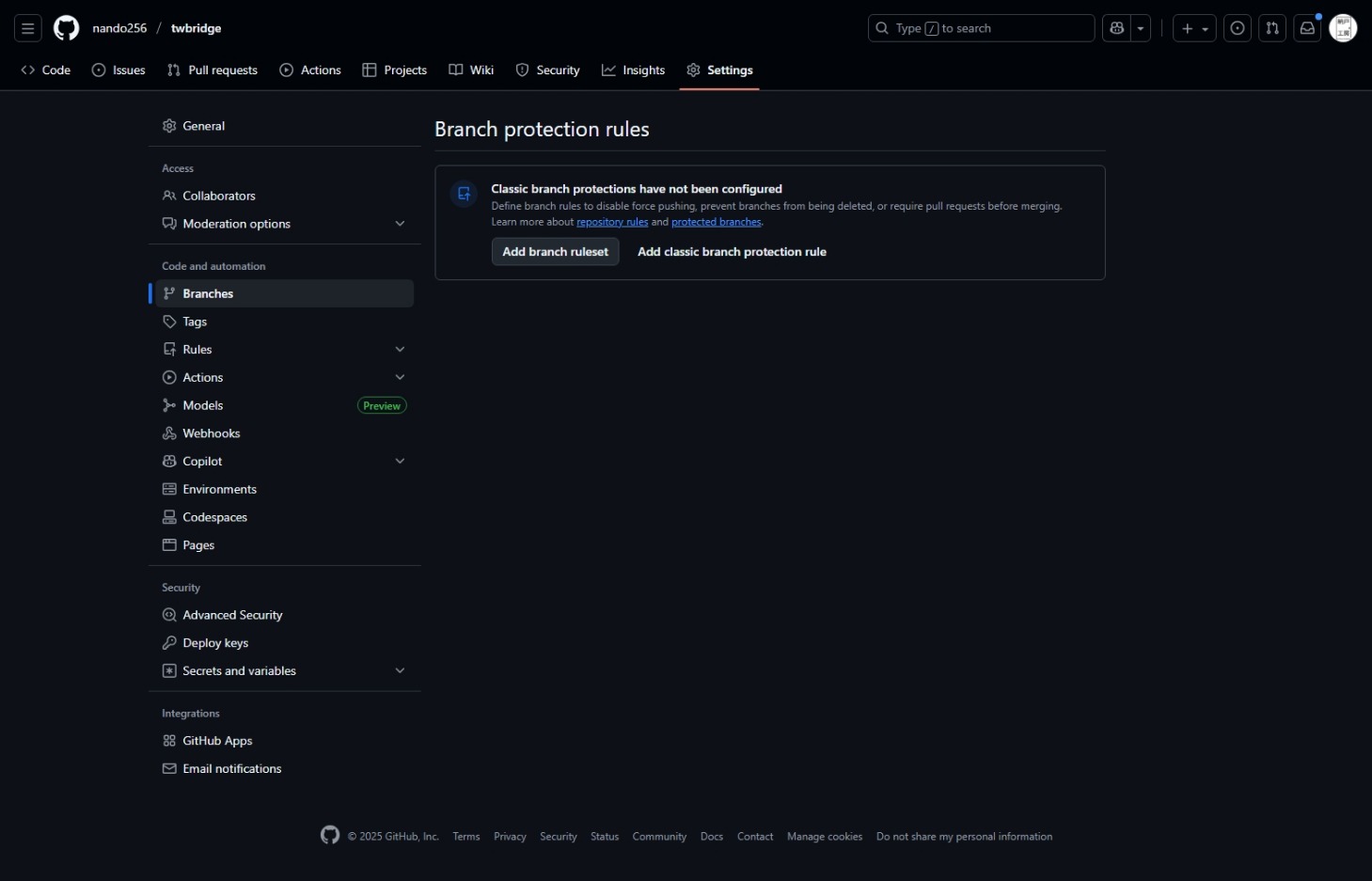
- Open https://github.com/nando256/twbridge
- Click on the Settings tab at the top
- Click on Code and automation → Branches in the left menu
- In the “Branch protection rules" section,
click Add branch ruleset

- Configure the settings as follows:
- Ruleset Name
3way merge (name it whatever you like) - Enforcement status
Active (enables the ruleset) - Target branches
Add target > Include default branch - Require a pull request before merging
Check the box - Leave everything else as is
- Ruleset Name
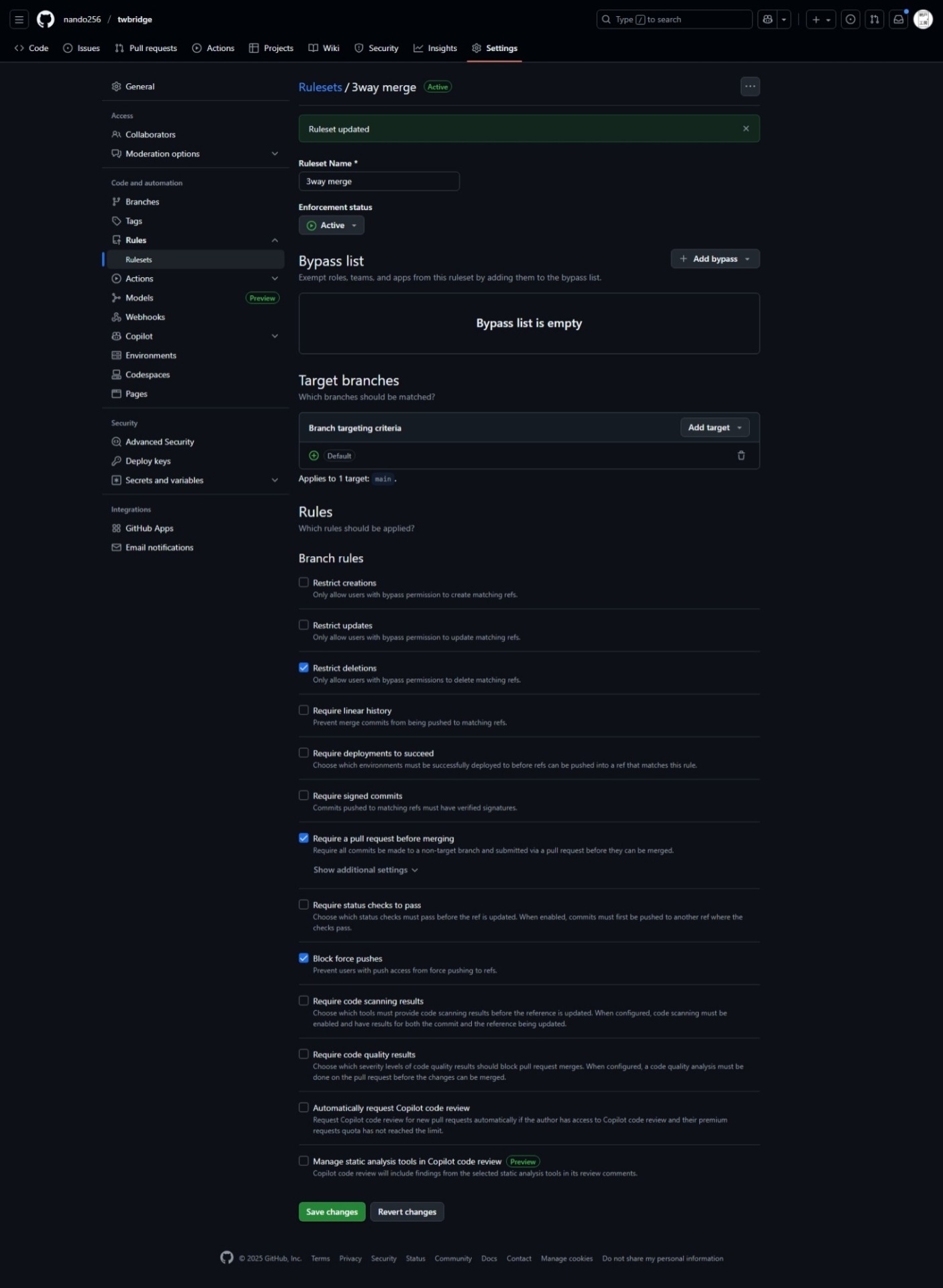 And that’s it.
We haven’t touched mandatory reviews, required status checks, or CI at all this time.
About 3-Way Merges
GitHub’s default “Merge pull request" button performs a 3-way merge (including a merge commit), so:
- Repository Settings → General → Pull Requests
- If Allow merge commits is ON, you can use 3-way merges.
You can leave the Squash and Rebase settings as they are according to your preference.
(Without changing anything, it will perform a 3-way merge using “Merge pull request" just like before.)
Workflow Overview
1. Cut a branch from main
git checkout main
git pull origin main
git checkout -b feature/xxx
2. Make changes → Commit → Push to GitHub
git add .
git commit -m "Something"
git push origin feature/xxx
3. Create a Pull Request on GitHub
4. Review the changes yourself → Click “Merge pull request" (3-way merge)
That’s all there is to it.
Without any CI or enforced reviews, this gives you a minimal setup consisting of “cannot push directly to main & 3-way merge via pull request."
If You Want to Revert
If you ever find yourself thinking:
- “I actually want to push directly to main again."
- “I want to loosen up some of the rules."
You can easily revert it by going to the Rules > Rulesets screen and setting it to Disable.
Summary
What we did is extremely simple:
- Configured branch protection for the default branch (main)
- target branches: default branch
- bypass: none
- Require a pull request before merging: on
With just this,
- Direct pushes to main are blocked
- The workflow naturally follows the pattern of branching out, opening a pull request, and doing a 3-way merge
- Deletions of main and force pushes are also prevented
This gives us a “minimal yet effective guardrail."
Even in solo development, treating main carelessly will come back to haunt you later.
Instead of just “trying to be careful," physically preventing direct pushes to main makes it much easier to keep your history clean and experiment freely on branches.
For now, I plan to operate with this lightweight setup and add things like “required reviews" or “mandatory CI" whenever the need arises.