Added “Tables” to the Minecraft (Paper) Whiteboard Plugin
The Whiteboard plugin developed at Nando Kobo is a plugin designed to bring “whiteboards where you can write text" directly into the world of Minecraft.
By posting text, you can easily share things like:
- Today’s to-do lists
- Command notes
- Mission explanations for kids
in-game, which is super convenient.
However, as I continued to use it more and more, there was a feature I desperately started wanting:
I wanted to display things in a table format rather than just bullet points.
Where Bullet Points Just Wasn’t Enough
Up until now, since Whiteboard is text-based,
if you wanted to display a “Mission List," you had to write it something like this:
- #1 Build a house (Level 1)
- #2 Build an animal statue (Level 1)
- #3 Build a mini racetrack (Level 2)
However, when actually playing with kids, I noticed a few things I wanted:
- I want to sort them by level
- I want to show “whether it has been completed or not" at the same time
- I want to visually compare them at a glance
With bullet points, the moment you put a lot of information in, it tends to get vertically long,
and there’s a limit to how many items can be displayed at once.
So I thought, “It would be much simpler if I just turned it into a table."
What I Did This Time: Recognizing the table Tag
Therefore, I added a feature to the Whiteboard plugin that:
- Reads HTML <table> tags and renders them as a simple table on the whiteboard.
The mechanism is roughly like this:
<table>
<tr><th>#</th><th>Goal</th><th>Level</th></tr>
<tr><td>1</td><td>Build a house</td><td>1</td></tr>
<tr><td>2</td><td>Build an animal statue</td><td>1</td></tr>
</table>
-
When you write the book’s contents into the Whiteboard, the plugin combines all pages of the book to retrieve them as text.
-
Edit that text using Codex, parse
<table>...</table>, and break it down into rows and columns. -
For rendering on the Whiteboard, display it as a |-delimited simple table.
|#|Goal|Level|
|1|Build a house|1|
|2|Build an animal statue|1|
Currently, it doesn’t draw “boxed borders" as graphical shapes,
instead treating it as a text-based table.
Even so, just being able to see “rows" and “columns" at a glance rather than a “long, trailing vertical list" has made it much easier to read.
How It Is Actually Used (Making a Mission List into a Table)
Speaking of the current mission, you can use it like this:
<table>
<tr><th>#</th><th>Goal</th><th>Level</th></tr>
<tr><td>1</td><td>Build a house (Free theme)</td><td>1</td></tr>
<tr><td>2</td><td>Build animal/mob statues</td><td>1</td></tr>
<tr><td>3</td><td>Mini racetrack (Short course)</td><td>1-2</td></tr>
<tr><td>4</td><td>Creature habitat series</td><td>1-2</td></tr>
</table>
When you write this in a book and post it on the Whiteboard,
the goals and levels line up horizontally.
The Issue of Books Not Fitting on a Single Page
Since Minecraft books have a character limit per page,
it’s completely normal for a single table not to fit on just one page.
To handle this, the Whiteboard side:
- Concatenates all pages of the book before parsing them.
Because of this,
- Even if a <table> ends at the bottom of the first page
- And <tr>…</tr> continues onto the second page,
it can be handled as a single table without any issues.
The writer simply needs to do what feels natural: “If you run out of space, continue to the next page."
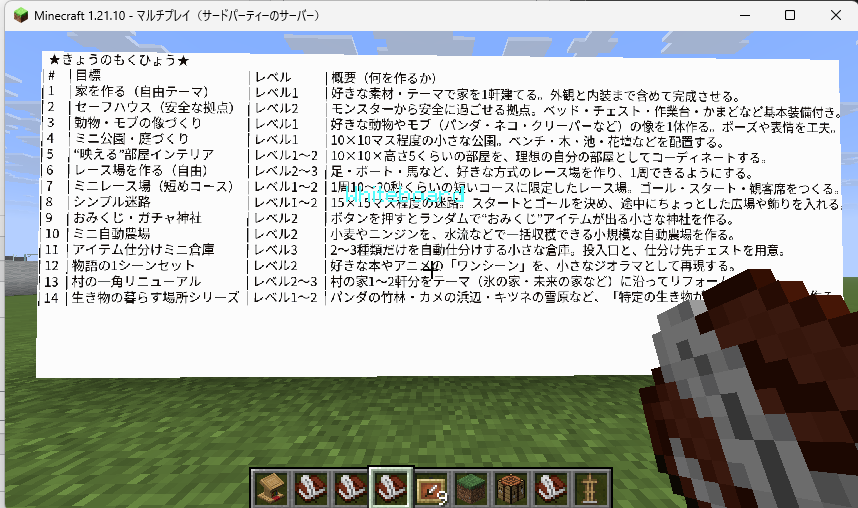
Summary: Being Able to Draw Tables Vastly Expands Whiteboard Use Cases
- Added HTML <table> tag support to the Whiteboard plugin, allowing tables written in Minecraft books to be displayed as simple tables on the whiteboard.
- While Minecraft books have character limits per page, treating the entire contents of the book as a single block of text allows multi-page tables to be handled seamlessly.
- As a result, information that naturally forms tables, such as:
- Mission lists
- Level charts
- Incentive and progress management
can now be brought directly into the Minecraft world.
It’s still a simple implementation, but just being able to handle “tables" feels like it greatly expands the potential use cases for the whiteboard.
Moving forward, while actually playing with the kids, I plan to:
- See what kinds of tables are convenient
- Figure out how complex of a layout might be needed
and quietly expand features as they become necessary.